Get Your Online Listings Ready Faster with Zetpy AI Product Descriptions
Products ready, but still stuck on the descriptions?

The stock has arrived, the photos are done, and you’re almost ready to list. There’s just one thing left: turning the supplier’s product details into something your customers can actually understand.

It sounds like a small job. Until you have a whole batch of products waiting and orders to get out the door.

So the descriptions get left for later. Or someone writes them in a rush, copying a few specifications and hoping that’s enough.

The trouble is, customers may still have questions. Will this fit? What’s it made of? Does it come with the accessories in the photo? If the description doesn’t tell them, they have to ask, guess or keep looking.

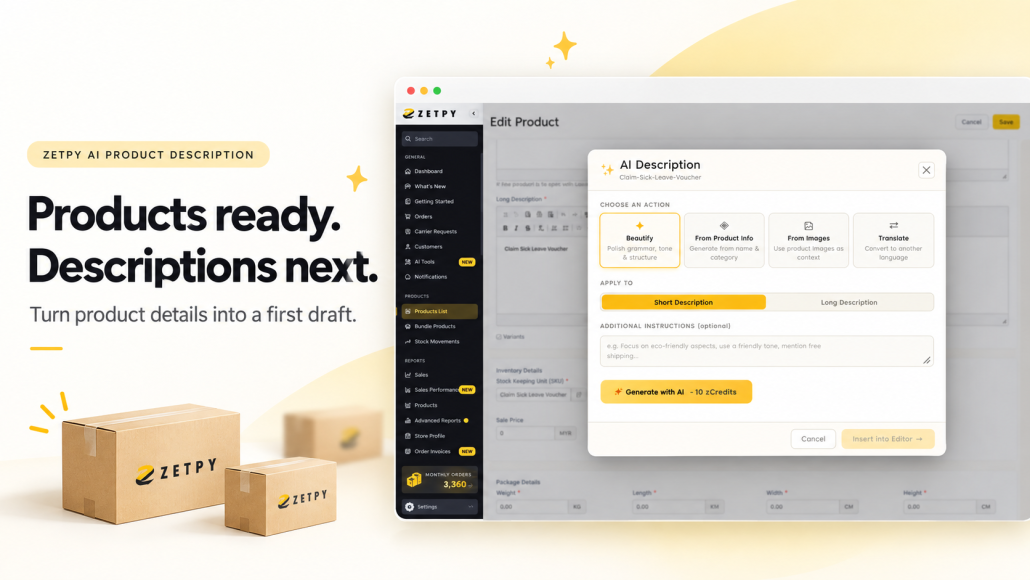
Zetpy AI Product Description helps you get a first draft together inside the product editor, so you have something to work with when you sit down to finish a listing.

Start with what you already have

You don’t always need to write a description from scratch. Sometimes the information is there, but it’s buried in a long paragraph or written in awkward English.

Choose the option that fits the job:

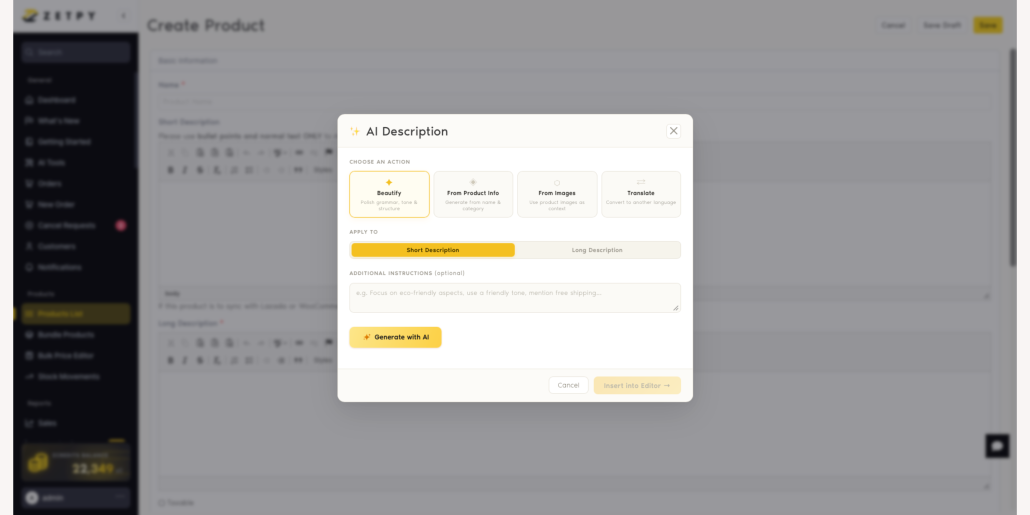
  • Beautify: Tidy up an existing description’s wording, grammar, tone and structure.
  • From Product Info: Create a draft using details such as the product name and category.
  • From Images: Use your product images as context for a draft.
  • Translate: Create a version in another language.

You can choose a short or long description and add instructions about the tone or details to focus on. Once the draft is ready, review it, insert it into the editor and make your final changes before saving.

The AI Product Description tutorial walks you through the steps.

A few useful details make a better starting point

Before you generate anything, think about what you’d want to know if you were buying the product.

Take a storage box. “Great for keeping your home organised” sounds fine, but it doesn’t tell a customer whether it will fit on their shelf or whether the lid is included.

The dimensions, material and package contents help answer those questions. Gather whatever you can confirm from the supplier’s information, then use those facts to guide the draft.

Your instruction can be simple:

Write in simple English. Start with a short introduction, followed by bullet points for the specifications. Use only the details provided, and don’t add extra features.

There’s no need to come up with a clever prompt. Be clear about what you want the customer to know.

If something is missing from the supplier document, check it before adding it to the listing. That saves your team from having to correct it later.

Work through a few listings at a time

Rewriting the whole catalogue is a big task to squeeze into an already busy week.

Start with the products that need attention first. That might be new arrivals waiting to go live, older listings with barely a sentence of information, or products that keep getting the same customer questions.

Those questions are useful clues. If people regularly ask whether a cable is included, make the answer easy to find in the description.

For similar products, agree on a basic structure your team can follow. A short introduction, key features, specifications and package contents may be enough. Use the sections that help explain the product.

This also makes reviewing easier. Everyone knows where to put the measurements and where to check what comes in the box.

Read the draft with the product details beside you

A draft can read well and still get a detail wrong.

Before saving, compare it with the information you’ve confirmed. Check sizes, materials, compatibility, included items and any claims about what the product can do.

Be especially careful when generating from images. A photo may show the shape or colour, but it won’t reliably tell you the exact material, capacity or performance.

For translations, check that the meaning and product terms are right. A sentence can be grammatically correct and still describe the wrong thing.

Then give the description one last read as a customer. Is the information easy to find? Does anything sound vague? Could you remove a sentence without losing anything useful?

Often, a shorter, clearer description is all the listing needs.

Get the next few listings finished

Pick a few products that have been waiting for descriptions. Gather their details, generate the drafts and review them before saving.

As you work through them, you’ll get a better sense of where your team needs help, whether that’s getting the first version written, cleaning up supplier wording or preparing another language version.

If product content is holding up your next launch, tell us where you’re getting stuck. We can show you how Zetpy AI Product Description fits into your listing process.

Book a Zetpy demo


Make Better Stock Decisions with Zetpy AI Sales and Inventory Insights

You’re getting ready for the next promotion when someone asks, “Do we have enough stock?”

Your best-selling bag is almost sold out. Another colour barely moved last month, and there are still boxes of it in the storeroom. Meanwhile, your supplier needs two weeks to send the next delivery.

These are familiar decisions for an e-commerce team. The sales figures are there, but finding time to go through them between orders, customer messages and campaign planning can be difficult.

Zetpy’s AI sales and inventory insights give you a starting point: a closer look at your sales patterns and a weekly view of which products need attention.

Look beyond the sales total

A good sales month is encouraging. Before you plan around it, though, it helps to know what happened.

Were orders strong throughout the month, or did most come in during a short promotion? Do customers tend to buy at certain times? How did this period compare with the previous one?

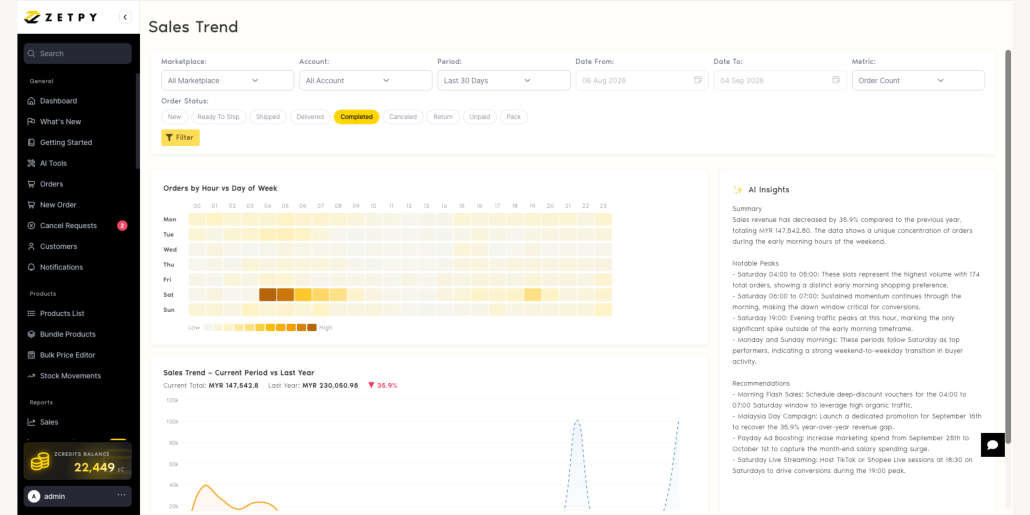
With Zetpy AI Sales Trend Analysis, you can filter sales by marketplace, account, period, date, order status and metric with a click. Charts and AI-generated insights help you explore order activity by hour and day, compare periods and spot sales peaks. Explore Zetpy’s AI sales trend.

For example, you might notice that evening orders were stronger during your last campaign. That could be worth testing when you schedule your next promotion.

Before changing the schedule, check what else was happening. Perhaps you ran a livestream that evening or offered a voucher for a few hours. Those details matter when deciding whether a pattern is likely to repeat.

Give stock planning a place in your week

It’s easy to put off a stock review when there are orders to pack. Then a popular item runs low, and you’re chasing your supplier for an urgent delivery.

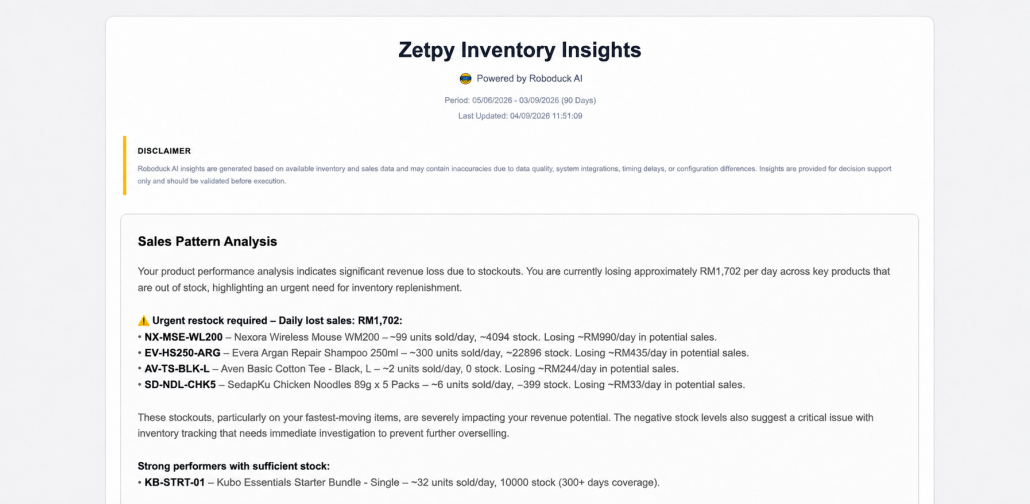
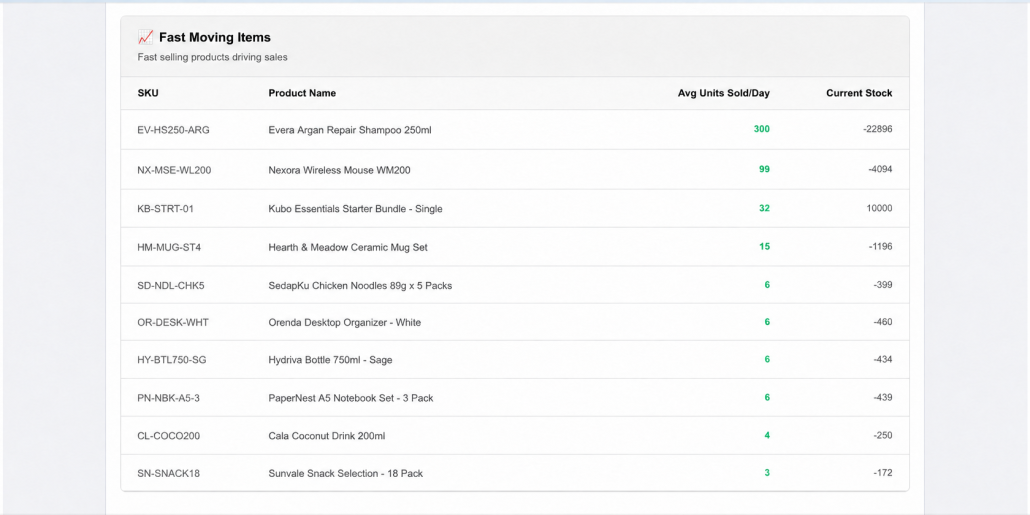
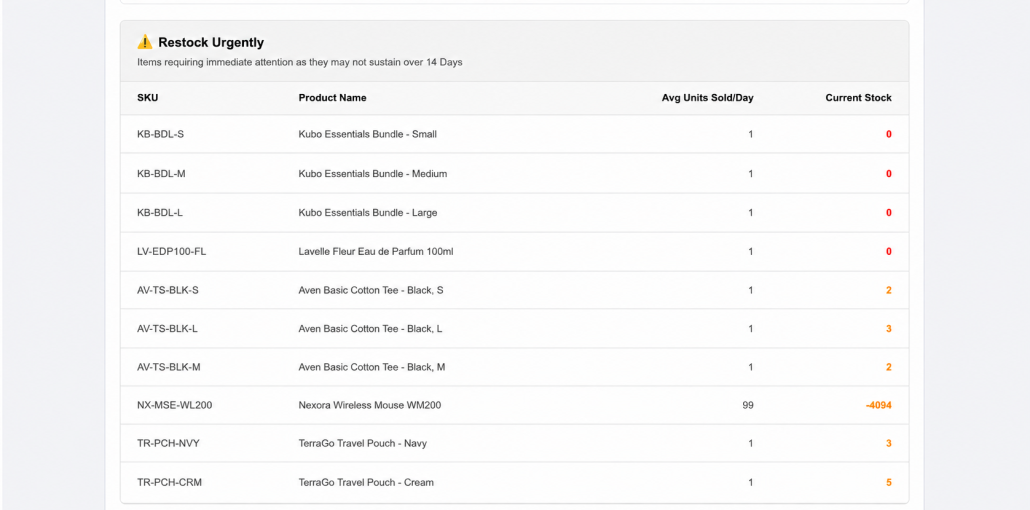
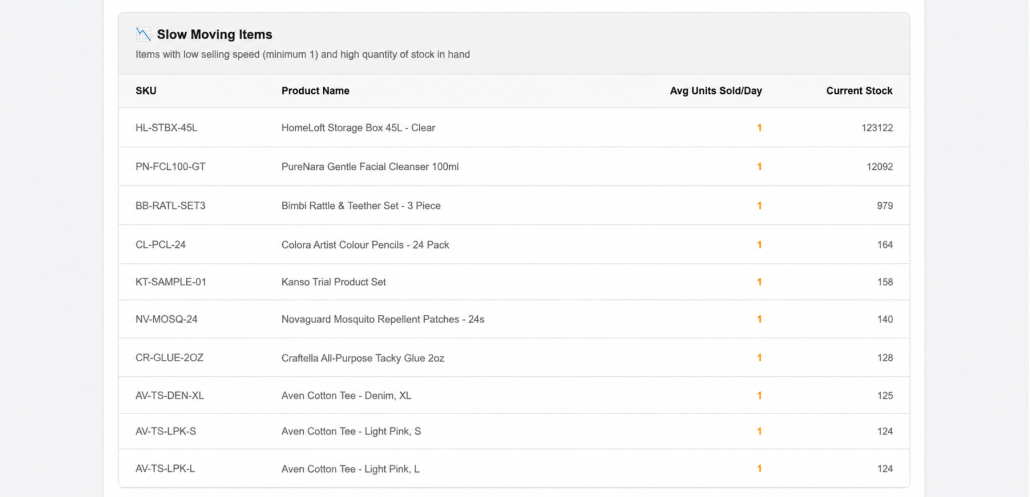
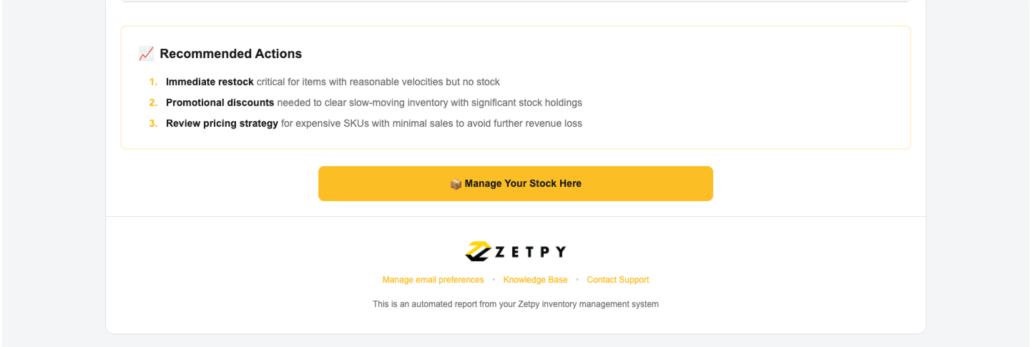
Zetpy Inventory Insight Email analyses the past 90 days of inventory activity and sends a weekly summary highlighting fast-moving products, slow movers and items that may need restocking. It also includes an Excel report for a closer review. Read about Inventory Insight Email.

Use that email as a reminder to sit down with whoever handles purchasing and check the products that have been flagged.

If a supplier needs 14 days to deliver, will your available stock last until then? Is another shipment already on the way? Are you about to include the item in a promotion?

Answering these questions before placing an order can help you choose a quantity that fits what’s happening in your business.

A slow seller needs a closer look

Let’s go back to the bags.

Suppose the black version sells steadily, but the green version has barely moved. Before reordering, it’s worth treating them separately.

For the black bag, check how many are left and when the next delivery can arrive.

For the green bag, open the listing. Does the main photo show the colour clearly? Can customers tell how big the bag is? Is the price still suitable compared with similar products?

You might decide to improve the photos, clarify the description or try a small promotion. You may also decide to hold off on buying more until you see whether those changes make a difference.

The report helps you notice the slow mover. Looking at the product and its listing helps you work out what to do about it.

Leave the review with something to do

A stock review is more useful when everyone knows what happens next.

Keep a short action list. For example:

  • Purchasing: Confirm the supplier’s delivery date for the black bag.
  • Listing team: Update the green bag’s main photo to attract more customers or bundle it with another fast selling product.
  • Marketing: Test an evening promotion and review the results afterwards.

Give each action an owner and a date. At the next review, check what was done and whether anything changed.

You don’t have to go through your entire catalogue in one sitting. Start with the products that need attention most, then build from there.

See how it fits your team

If preparing reports takes up more time than discussing what to do next, we can show you how Zetpy’s AI Sales Trend Analysis and Inventory Insight Email work.

Bring along the questions your team usually asks about sales and restocking. We’ll walk through the features with those in mind.

Book a Zetpy demo

5 Daily Tasks Eating Up Your E-commerce Team’s Time | Zetpy

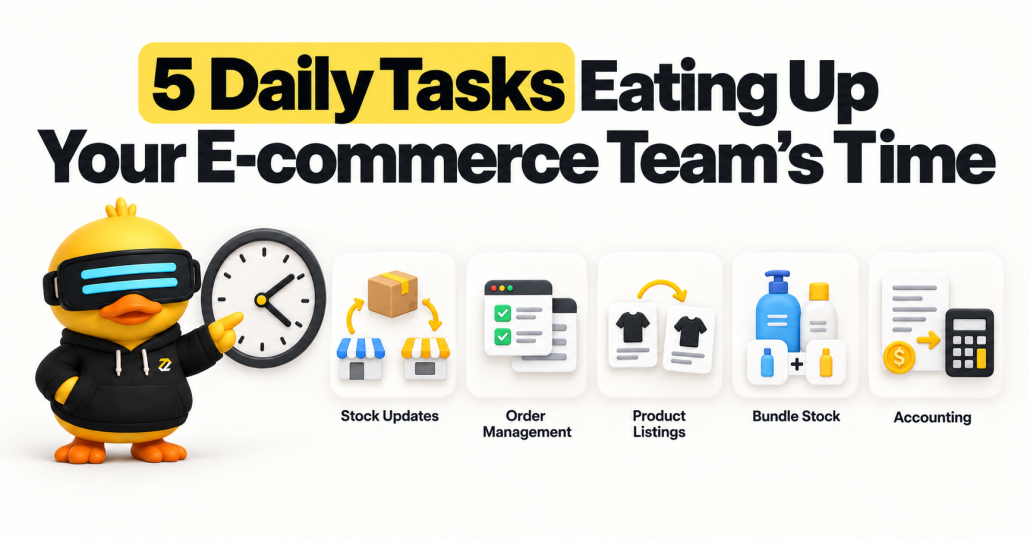
5 Daily Tasks Eating Up Your E-commerce Team’s Time

Your team has been busy all day.

Stock quantities have been updated. Orders have been checked. Product details have been copied into another marketplace. Sales information has been prepared for accounting.

But the works still seems like not able to finish in time and keeps piling up.

When you sell across multiple channels, small tasks can become a constant cycle of checking, copying and updating. To reduce manual work in e-commerce, start by identifying where your team handles the same information more than once.

Where do e-commerce teams lose time every day?

E-commerce teams can lose time updating stock across stores, switching between seller center to process orders, recreating product listings on every available channes, checking bundle quantities, manual key in sales into accounting software and resolving picking mistakes. Connecting these workflows helps reduce repeated work and gives teams more time to handle customers, exceptions and business growth.

Here are six places to look in your own operation.


1. Updating stock across multiple sales channels

An item sells on Shopee. Someone adjusts its quantity on Lazada. Another colleague checks whether the website still shows the correct stock.

Repeat that process across dozens of products, and inventory updates become a task that never quite ends.

The problem becomes harder when two people update different stores using different stock figures.

How Zetpy helps

Zetpy provides centralised inventory management and automatically updates stock across connected sales channels as orders are fetched. This helps reduce manual stock updates and the risk of overselling. Explore Zetpy’s inventory management features.


2. Switching between dashboards to manage orders

Your morning starts with several browser tabs.

One shows Shopee orders. Another shows Lazada. A third shows TikTok Shop. Your team checks each one, works out what needs processing and prepares shipping documents.

The time cost includes both switching screens and repeatedly rebuilding the order list in your head.

How Zetpy helps

Zetpy brings orders from Shopee, TikTok Shop and Lazada into one dashboard and supports bulk order processing and airway bill printing. An airway bill, or AWB, is the shipping label used for delivery. Learn about Zetpy’s centralised order management.


3. Recreating product listings for every store

You have a new product ready to sell. Your team uploads the images, adds the description, enters the product code and checks the variations.

Then they do it again for the next store.

If a detail changes later, someone has to remember to update each listing. Miss one, and customers may see different information depending on where they shop.

How Zetpy helps

Zetpy lets you create products and variations centrally, then upload them to supported sales channels, including Shopee, Lazada, TikTok Shop, Shopify and WooCommerce.

Explore Zetpy’s product and channel capabilities.


4. Manually calculating stock for product bundles

Say you sell shampoo on its own and as part of a shampoo-and-conditioner set.

When a customer buys the set, the stock for both individual items needs to be deducted too. Otherwise, you could continue selling quantities you no longer have.

This becomes more complicated when the same item appears in several bundles.

How Zetpy helps

Zetpy’s Product Bundle feature automatically deducts the stock of the individual items when a bundle sells. This helps you manage stock shared between standalone products and sets.

This is Zetpy’s own bundle feature, which is separate from the bundle tools offered by marketplaces.

See how Zetpy Product Bundles work.


5. Re-entering online orders into accounting software

An order has already been recorded in your sales channel.

Then someone needs to enter its details again in the accounting system in order for your sales channel and accounting system tally.

Repeated data entry takes time, and a wrong product code or missing detail can create more work during checking and reconciliation.

How Zetpy helps

Zetpy offers accounting integrations, including Autocount, QuickBooks Online and Xero. The integration supports syncing stock and online orders as invoices, and/or sales orders reducing the need to type the same sales information again.

How can you find your team’s biggest daily time drain?

Run a simple five-day time audit.

Ask each team member to record:

What to record Example
Repeated task Updating stock in separate stores
How often it happens 12 times a day
Time spent each time 3 minutes
Additional rework Checking a mismatched quantity
Systems involved Marketplace dashboards and a spreadsheet

Calculate the daily workload using:

Daily time spent = task frequency × minutes per task

For example, a task performed 12 times at 3 minutes each takes 36 minutes a day. Across five working days, that adds up to three hours.

This is an illustration, not a measured Zetpy customer result or a promise of time savings.

Start with a task that happens frequently, follows clear rules and requires the same information to move between systems. After making a change, measure the workflow again, including time spent checking errors or exceptions.

Give your team more time for work that needs their attention

Stock updates, order processing and accurate records all matter.

But every repeated entry deserves a closer look. Could the information flow between systems? Could several orders be handled together? Could a barcode check replace a manual comparison?

Zetpy connects product, inventory and order workflows across supported sales channels and business systems. See what Zetpy can connect.

Bring your most repetitive daily task to a Zetpy demo. We can help you explore which features fit your workflow and what setup is needed.

Book a Zetpy demo today to see it in action


Frequently asked questions

How can I reduce manual work in e-commerce operations?

Identify tasks where your team repeatedly copies, checks or updates the same information. Prioritise a frequent, predictable task, connect the relevant systems and measure the time spent before and after the change.

What is multichannel inventory management?

Multichannel inventory management means managing stock for products sold through more than one sales channel. A central inventory system helps coordinate stock updates across connected stores.

How does Zetpy help with daily order management?

Zetpy consolidates orders from supported sales channels into one control panel. Teams can review order information and updated statuses without checking each store separately. View Zetpy’s order management features.

Can Zetpy connect e-commerce orders to accounting software?

Yes. Zetpy offers integrations with accounting systems including AutoCount, Xero and QuickBooks. The available workflow depends on the integration and its configuration. Explore Zetpy’s accounting connections.

Which task should my team simplify first?

Start with the repetitive task that consumes the most time and has clear, consistent steps. Stock updates, order processing and duplicate data entry are useful areas to audit. Keep responsibility for checking exceptions clearly assigned.

Work Smarter with Zetpy’s Latest AI Features

Introducing Zetpy’s Latest AI Features


Running an e-commerce business means making decisions every day. Which products are selling well? What should you restock? How can you write better product descriptions and prepare attractive product images without spending hours on every listing?

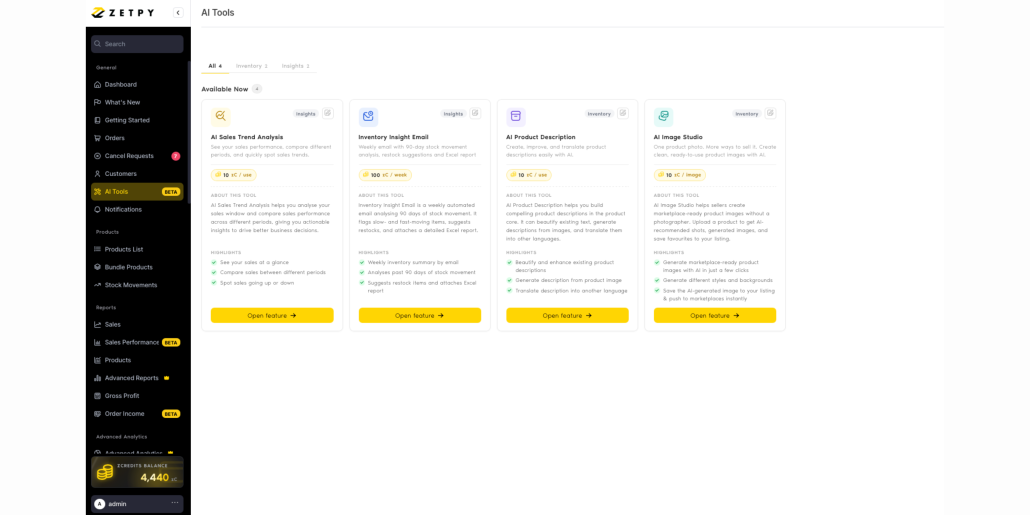
Zetpy’s latest AI features are designed to make these tasks easier. Available from the AI Tools section in Zetpy, these tools help turn your business data and product information into practical insights and ready-to-use content.

The four latest AI features are:

  1. AI Sales Trend Analysis
  2. Inventory Insight Email
  3. AI Product Description
  4. AI Image Studio

1. Understand Your Sales with AI Sales Trend Analysis

AI Sales Trend Analysis helps you review your sales performance and understand what the numbers mean with a single click.

You can filter the analysis by marketplace, account, period, date, order status, and metric. Zetpy then presents the results through easy-to-read charts, including order activity by hour and day, as well as sales comparisons between different periods.

The AI-generated insights highlight notable sales peaks, summarise performance, and provide practical recommendations based on the selected data. This can help you identify strong selling periods, plan promotions, and make more informed business decisions.

For example, if your orders regularly peak during a certain time of day, your team can use that insight when planning campaigns, livestreams, or staffing.


2. Stay Ahead of Stock Issues with Inventory Insight Email

Keeping the right amount of stock is a constant balancing act. Too little stock can lead to underselling, while too much stock can tie up cash as well as warehouse space.

Inventory Insight Email gives your team a weekly automated view of stock movement. It analyses the past 90 days of inventory activity, identifies fast-moving and slow-moving products, and suggests items that may need restocking.

The email also includes a detailed Excel report, making it easier for your team to review as well.

This feature can help you:

  1. Notice potential restocking needs earlier
  2. Identify products that are moving slowly
  3. Review inventory performance without preparing reports manually
  4. Make purchasing and stock-planning decisions using clearer information

3. Create Better Listings with AI Product Description

Writing product descriptions for many items can be repetitive and time-consuming. AI Product Description helps you prepare and improve listing content directly within Zetpy’s product workflow.

You can use it to:

  1. Check and improve the grammar, tone, and structure of an existing description
  2. Generate a description based on the product name and category
  3. Help you to write a description using product images as context
  4. Translate a description into another language
  5. Apply the result to a short or long product description

You can also provide additional instructions, such as highlighting eco-friendly features, using a friendly tone, or mentioning a specific product benefit.

Once the content is generated, you can review it for accuracy and insert it into the product editor. This gives your team a faster starting point while keeping you in control of the final wording.


4. Produce Product Visuals with AI Image Studio

A good product image can help shoppers understand your products and can make your listings stands out more. However, the time and cost to be spent on every photo shoot for every product may not be practical.

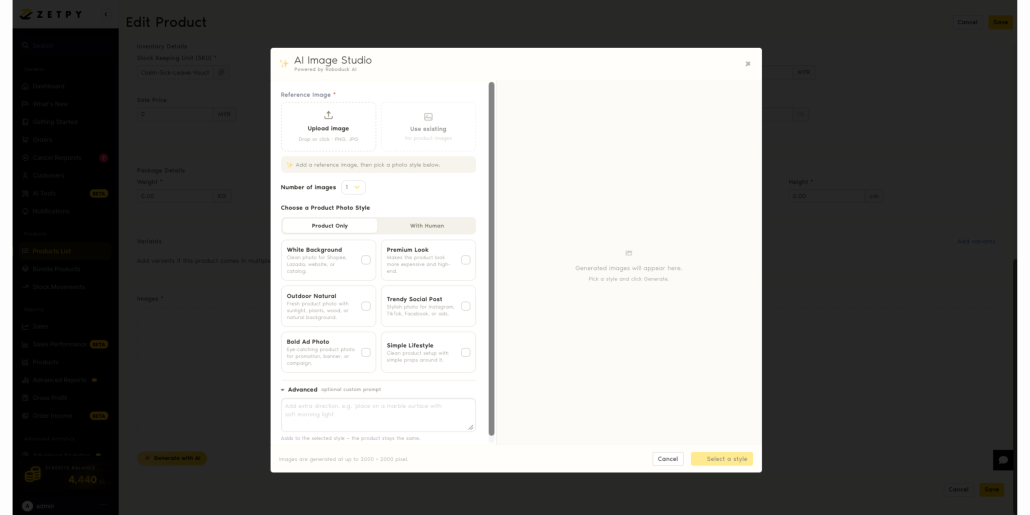
Zetpy’s AI Image Studio helps you generate marketplace-ready product images from a reference image. Upload a new image or select an existing product image, then choose a visual style that suits your goal.

Available styles include:

  1. White Background: Clean images that suitable marketplaces, websites, and catalogues
  2. Premium Look: A more polished and high-end product presentation
  3. Outdoor Natural: A natural setting with sunlight, plants, wood, or a natural background
  4. Trendy Social Post: Stylish images for Instagram, TikTok, Facebook, or advertisements
  5. Bold Ad Photo: Eye-catching images for promotions, banners, or campaigns
  6. Simple Lifestyle: A clean product scene with simple props

You can choose a product-only image or a composition featuring a person. Advanced options also let you provide extra creative direction.

Generated images can be produced at up to 2000 × 2000 pixels. Do always remember to review AI-generated visuals before publishing to ensure the product remains accurate and the image follows each marketplace’s listing guidelines.

Get More Done with Zetpy AI

Zetpy’s new AI tools act as useful assistant for you to use to manage your e-commerce operations. They can help your team understand real-time sales patterns, monitor inventory, prepare product descriptions as well as create product visuals with less manual work.

However, do always review its recommendations and generated content before making business decisions or publishing anything, especially when product details, claims, translations, prices, or marketplace requirements are involved.


📚 Check out our step-by-step tutorials here


Want to learn more about Zetpy’s latest AI features? Book a Demo today!

Frequently Asked Questions

What are zCredits?

zCredits are credits used to run Zetpy’s AI features. The current rate is RM1 for 10 zCredits.

How can I top up my zCredits?

For now, contact the Zetpy Sales Team to request a top-up. A self-service top-up option is planned for the Zetpy platform in the future.

Should I review AI-generated content before using it?

Yes. Always check descriptions, insights, recommendations, translations, and images for accuracy and suitability before publishing or making business decisions.

Prevent Interrupted Sync: Reauthorize Your Marketplace Accounts Before the 9.9 Sale

The 9.9 sale can bring a sharp increase in orders across Shopee, Lazada, TikTok Shop, and other online sales channels.

Most sellers prepare their promotions, inventory, advertising, and fulfilment plans before the campaign. However, there is another important task that should be included in your checklist: checking the authorization status of every marketplace account connected to Zetpy.

Marketplace authorization can expire from time to time. Zetpy advises users to reauthorize their accounts before the expiry date so syncing between Zetpy and the marketplace can continue.

Completing this task before 9 September and major sales day gives your team time to confirm that orders and inventory are still moving through the expected workflow.

What Is Marketplace Reauthorization?

When you connect a marketplace seller account to Zetpy, you authorize Zetpy to exchange supported information with that marketplace.

Depending on your Zetpy setup and connected channels, this may include:

  1. Products
  2. Inventory quantities
  3. Marketplace orders
  4. Order statuses
  5. Related sales information

Marketplace authorization does not always remain active permanently. This is due that marketplace authorization may expire due to security reason based on the platform requirements. We recommends renewing it before the expiry date to continue marketplace syncing.

Check out Zetpy’s official reauthorization guide for the correct steps to reauthorize the online marketplace

Why Reauthorization Matters Before 9.9

An expired authorization can interrupt the connection between Zetpy and the affected marketplace account.

During a normal sales period, your team may have more time to identify and investigate a connection issue. During a major campaign, orders can arrive much more quickly. This can make even a short interruption harder to manage.

Here are some of the operational risks sellers should consider.

Inventory updates may be interrupted

Zetpy supports centralized inventory control across connected sales channels. As orders are received, Zetpy can update inventory across those channels.

If the authorization for a marketplace account has expired, the affected connection may not continue syncing as expected. This could increase the risk of overselling if it is not detected quickly.

Marketplace orders may not enter the normal workflow

Zetpy allows sellers to view orders from multiple supported sales channels in one control panel.

If an account connection is interrupted, your team may need to check the marketplace Seller Center one by one until the connection is restored. This adds another layer of manual work during a busy campaign.

Order processing may be delayed

When marketplace orders do not enter your normal workflow, your team may take longer to identify and process them.

The risk of late shipment or missed out shipping deadlines becomes more high when campaign orders arrive across several marketplace accounts at the same time.

Connected business systems may receive incomplete data

Zetpy supports integrations with selected POS and accounting systems. Zetpy’s supports syncing orders from supported online channels into Xero, QuickBooks, AutoCount, Xilnex and Zeoniq depending on the integration and configuration.

An interrupted marketplace connection could affect the flow of information into these downstream workflows. Sellers should therefore test the complete process used by their business, not only the connection status.

Which Marketplace Accounts Should You Check?

The current Zetpy reauthorization guide includes instructions for:

  1. Shopee
  2. Lazada
  3. TikTok Shop

Check every seller account connected under these marketplace plugins.

If your business manages multiple shops, review each account separately. One successfully authorized shop does not confirm that every other marketplace account is active.

For other Zetpy-supported channels, check the status inside your account setting page or contact Zetpy Support if you receive an authorization warning.

How to Reauthorize Your Marketplace Account in Zetpy

Zetpy has published an official guide with instructions and screenshots for Shopee, Lazada, and TikTok Shop.

Follow the complete guide here: How to Reauthorize Your Marketplace Account in Zetpy.

The general process is:

  1. Open the relevant Shopee, Lazada, or TikTok Shop plugin in Zetpy.
  2. Select Edit Accounts.
  3. Select Edit for the account that requires reauthorization.
  4. Confirm that the email address matches the correct marketplace account.
  5. Save the account details.
  6. Complete the authorization process on the marketplace platform.
  7. Return to Zetpy and confirm that a green tick appears beside the account.

The login requirements differ by marketplace. Follow the platform-specific instructions in the Zetpy guide carefully.

For example, the guide contains an important Shopee instruction not to use a Main or Sub Account to log in during reauthorization. TikTok Shop users must also select the correct account type for their region before completing the authorization.

If the marketplace authorization page does not open, check whether your browser is blocking pop-ups. Zetpy’s official guide includes additional help for this issue.

Test the Connection After Reauthorization

A green tick confirms that the account was successfully reauthorized. You should still test the operational workflow before the campaign begins.

Complete the following checks:

  1. Confirm that recent marketplace orders appear in Zetpy.
  2. Compare inventory quantities for several active SKUs.
  3. Review your fast-selling 9.9 campaign products.
  4. Check whether inventory changes reach the intended sales channels.
  5. Review any warnings or failed sync records.
  6. Test connected POS or accounting workflows where applicable.


Do Not Wait Until 9 September

Complete reauthorization and testing several days before the 9.9 sale.

Preparing early gives your team time to:

  1. Correct marketplace login problems
  2. Investigate inventory differences
  3. Check and review if any error appeared
  4. Contact Zetpy Support if there is any issue

Leaving reauthorization until the campaign starts could create unnecessary pressure for your operations team.

Monitor Your Connections During the Campaign

Reauthorization is part of campaign preparation, but your team should continue monitoring the workflow during the sale.

Assign a team member to:

  1. Check that new marketplace orders are appearing in Zetpy
  2. Review inventory for selected high-volume SKUs
  3. Watch for connection or sync warnings
  4. Report unusual order or inventory behaviour

This gives your business an additional layer of operational visibility during a busy sales period.

How Zetpy Supports Multichannel Sellers

Zetpy provides a central platform for managing products, inventory, and orders across supported marketplaces and webstores.

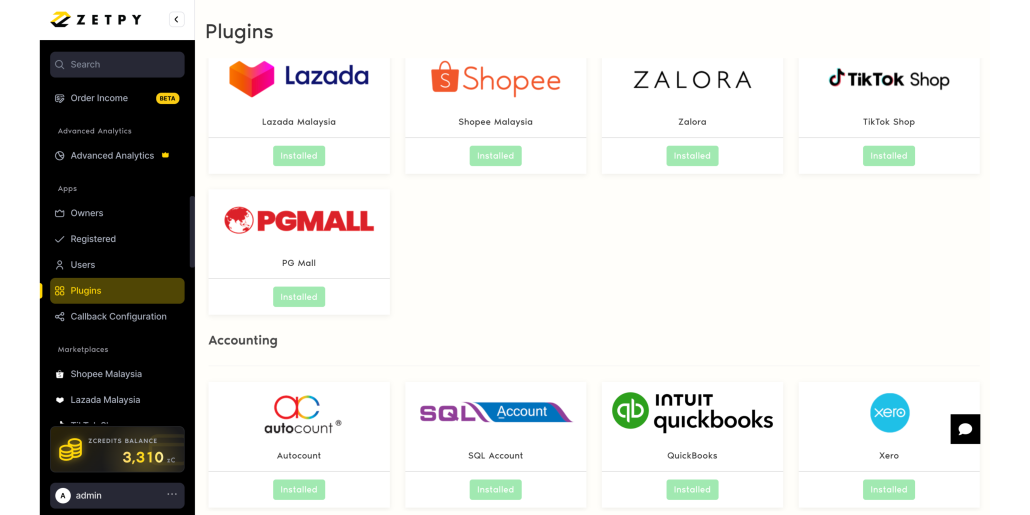
Current Zetpy pages list integrations with marketplaces including Shopee, Lazada, TikTok Shop, Zalora, and PGMall. Zetpy also supports shopping carts such as Shopify, WooCommerce, and Magento, together with selected POS and accounting integrations. Available channels and features may vary by country, plugin, and business configuration. View Zetpy’s current integration partners.

With an active and correctly configured connection, Zetpy can help sellers:

  1. Manage products and inventory across supported channels
  2. View multichannel orders in one control panel
  3. Reduce repetitive inventory updates
  4. Manage product variations
  5. Connect marketplace operations with supported POS and accounting systems
  6. Maintain clearer visibility across multiple sales channels

These capabilities become especially useful during major campaigns, when teams need to manage a larger number of orders across several stores. Learn more from Zetpy’s Product Tour.


Want to simplify your multichannel operations with Zetpy?
Book a free demo with the Zetpy team to explore centralized marketplace order and inventory management.

Turn Selected Xilnex POS Products Into Marketplace Listings With Zetpy

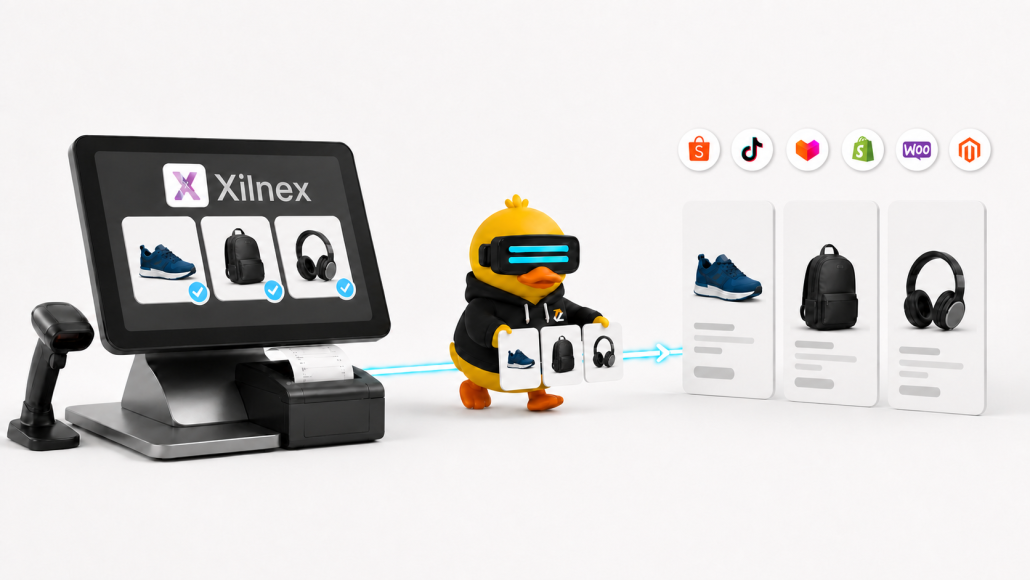
A product may already be complete in Xilnex, with its item code, price, stock and image ready. Relisting that same item for Shopee, TikTok Shop, Lazada or another online channel adds work that your team should not have to repeat.

Zetpy provides a more practical route. You can sync selected products from Xilnex into Zetpy, prepare them for online selling and publish them to your connected sales channels.

When customers place orders online, those orders can be sync from Zetpy to Xilnex as Sales Orders or Sales Invoices.

Start with the products you actually want to sell online

Most retailers do not need their entire POS catalogue online.

Some products may only be available in-store. Others might not have suitable packaging, images or delivery options yet. If your Xilnex catalogue contains thousands of items, importing everything would only create more products for your e-commerce team to sort through.

Zetpy lets you import selected Xilnex items. This means your team can start with the products that are ready to sell and add more later.

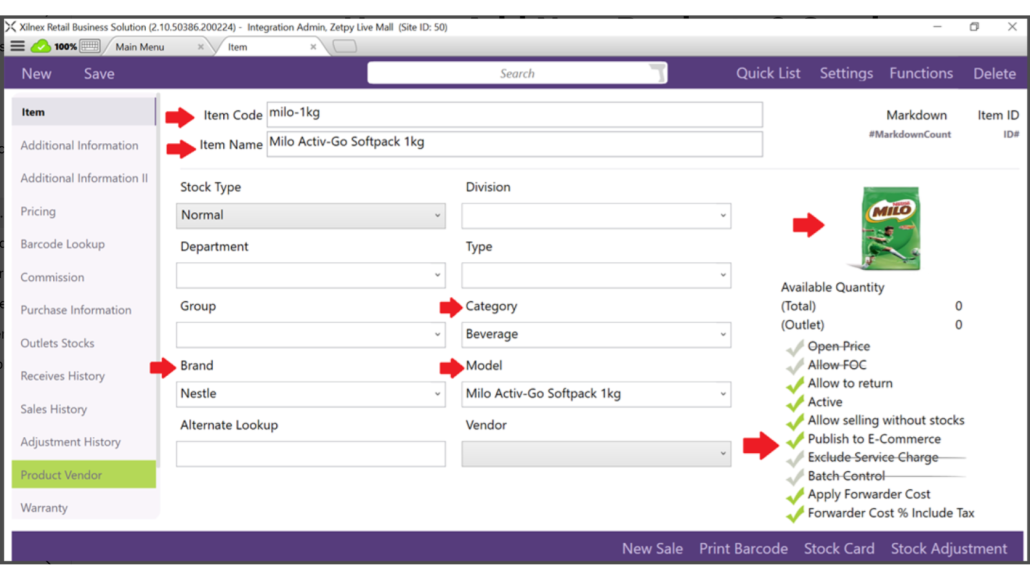
Before an item can be imported, check that it is active in Xilnex and that Publish to E-Commerce has been enabled. The product must also have an item code and item name.

The item code matters because it should match the SKU used by your marketplaces and online stores. A consistent SKU helps Zetpy identify the same product across different systems.

What comes across from Xilnex?

Depending on the information available in Xilnex, the import can include:

  1. Item code and item name
  2. Model
  3. Category and brand
  4. Product description
  5. Sales price
  6. Weight and dimensions
  7. Product image

You do not need to wait until every field is perfect. The item code and item name are the minimum requirements, while other details can be completed in Zetpy.

That said, it is worth preparing as much information as possible in Xilnex first. A product with a clear name, correct price, useful description and suitable image will need less work after the import.

Zetpy currently supports the import of eligible NORMAL, PREPACK and POSTPACK products, subject to the relevant Xilnex settings and version requirements. You can review these requirements in Zetpy’s Xilnex product import guide.


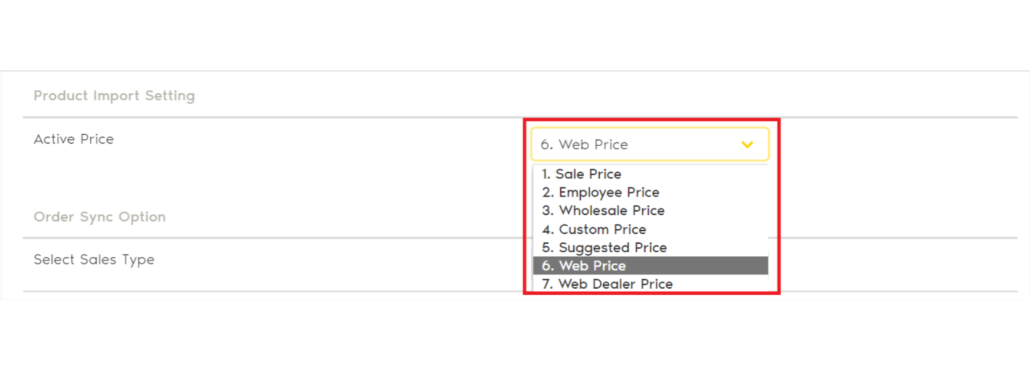
Choose which Xilnex price to use

A retailer may use one price at the counter and another online. That is normal, especially when marketplace fees, delivery costs or online promotions are involved.

Xilnex supports several price types. During the Zetpy setup, you can choose which one will be used for the initial product import.

Once the item is in Zetpy, you can review and change its selling price before adding it to a marketplace or webstore.

One detail deserves attention here: the price is imported from Xilnex during the first product import. If you later change that price in Xilnex, it will not automatically overwrite the product price already stored in Zetpy. Your team should therefore decide where online prices will be maintained after the initial setup.

Prepare each product for its online channel

Importing a product does not automatically mean it is ready to publish.

A POS system and a marketplace use product information differently. Xilnex may already contain everything your retail team needs, but Shopee or Lazada could require an online category, shipping dimensions, product attributes or variation details.

After importing an item, open the Zetpy Products page and check:

  1. Is the product title clear to an online shopper?
  2. Does the description explain the important features?
  3. Are the images suitable for a marketplace listing?
  4. Are the weight and parcel dimensions correct?
  5. Is the online selling price correct?

This is also where you can improve a short POS item name. Something like “Kettle 1.7L BLK” may work for a cashier, but an online shopper would understand “1.7L Electric Kettle, Black” more easily.

Add the product to your connected online marketplace or webstore

Once the listing details are ready, you can add the product to a supported sales-channel plugin in Zetpy.

Depending on your Zetpy subscription and account setup, the Xilnex integration can be used with channels such as Shopee, TikTok Shop, Lazada, Zalora, Shopify, WooCommerce and Magento. Make sure that the online channels that you want to sell the item on is authorized with Zetpy before planning a rollout.

Keep Xilnex as your stock reference

A product listing is only useful when its stock is accurate.

If an item sells at your physical store, the quantity changes in Xilnex. With Zetpy’s Xilnex integration, Zetpy will then detect the stock changes and sync to the updated inventory to connected online channels.

This helps reduce the amount of manual stock updating required from your team. It can also lower the risk of accepting an online order for an item that has already sold in-store.

For this workflow, stock should be managed from Xilnex. A quantity entered directly in Zetpy may update the connected marketplaces, but it will not update the stock in Xilnex.

Keeping one clear inventory source avoids situations where different team members maintain different quantities in different systems.


What happens when an online order arrives?

The integration is not limited to products and stock.

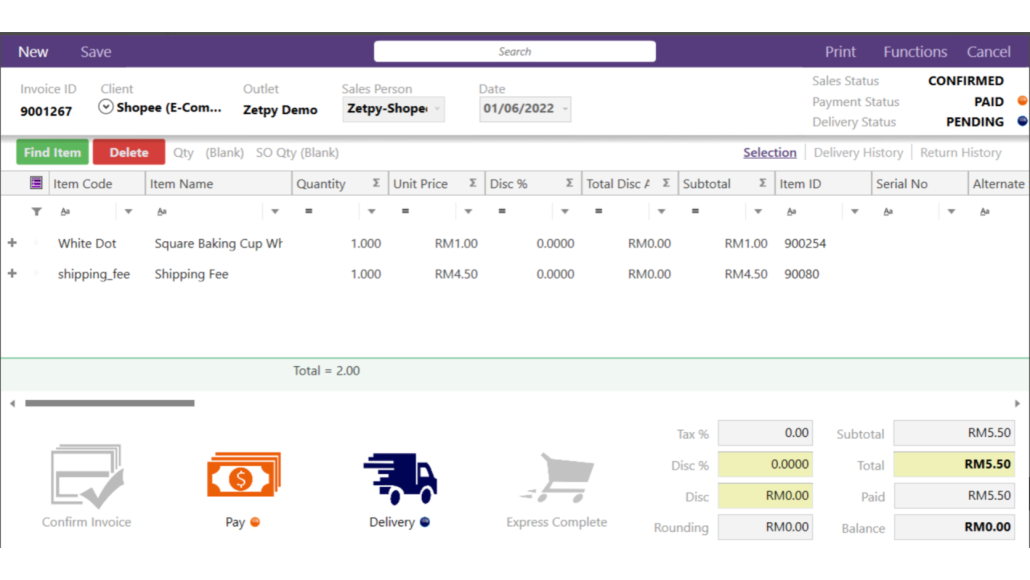
Orders from connected marketplaces and webstores can enter Zetpy and then be sent to Xilnex. You can choose whether they should be created as:

  1. Sales Orders, which do not deduct stock in Xilnex
  2. Sales Invoices, which deduct stock in Xilnex

The right option depends on how your business handles payment, fulfilment, stock and e-Invoice submission.

For example, a business that wants to confirm an order before completing the sale may prefer to begin with a Sales Order. Another retailer may create a Sales Invoice once the marketplace order reaches a specific status.

Zetpy supports both manual and automatic order-import workflows. If you choose automatic importing, you can select the order status that should trigger the transfer to Xilnex. If you prefer more control, your team can review and select orders manually.

Order details transferred to Xilnex can include the buyer’s information, purchased SKU, online order reference and sales channel. The resulting Xilnex Sales ID can then be viewed in Zetpy.

See Zetpy’s Xilnex order sync guide for the current configuration steps and required item codes.

A simpler path from the brick-and-mortar to online selling

Moving online should not mean recreating your online product catalogue from zero.

With Zetpy and Xilnex, you can choose the products that are ready for e-commerce, import their existing information and complete the marketplace-specific details in Zetpy. Stock changes can move from Xilnex to your connected channels, while online orders can return as Sales Orders or Sales Invoices.

For retailers managing both physical and online sales, that creates a much cleaner daily routine.


Want to connect Xilnex to your online sales channels?

Speak with us today about your current product, inventory and order workflow. Our team can help you identify the right setup for your retail and e-commerce operations.


Frequently asked questions

Can I import only selected Xilnex products?

Yes. Zetpy supports importing specific eligible items instead of requiring you to import your entire Xilnex catalogue.

Which details are required?

An item must be active, enabled for e-commerce publishing, and have an item code and item name.

Can I change the product information after importing it?

Yes. You can edit its online title, description, price, images and other listing information in Zetpy before publishing to your online channels..

Can online orders be sent back to Xilnex?

Yes. Eligible online orders can be sent from Zetpy to Xilnex as Sales Orders or Sales Invoices, based on your settings.