Zetpy is now officially available on the QuickBooks App Store!

We’re excited to share some great news with you — Zetpy is now officially available on the QuickBooks App Store! 🎉

👉 Check it out here

This marks another major step forward in helping you streamline your e-commerce and accounting processes all in one ecosystem. If you’re already using QuickBooks Online or planning to automate your accounting, this integration is made just for you!


💡 What Does This Integration Do?

Zetpy’s integration with QuickBooks helps you:

  • 📦 Sync orders from your online marketplace (Shopee, Lazada, TikTok, and more) and your own Brand.com directly into QuickBooks.

  • 🛒 Sync Stocks from your Xero to your marketplace and brand.com with this integration!
  • 🧾 Auto-generate invoices in QuickBooks Online — no more manual entry.

  • 📊 Ensure your financials stay accurate and up-to-date, every single time.


🔗 Why Connect Zetpy to QuickBooks?

Managing your eCommerce orders is already seamless in Zetpy — now your finances can keep up too.

With this integration:

  • ✅ You save hours on manual bookkeeping – save the time on creating your online orders into invoices one by one and use it to develop your business!

  • ✅ Reduce accounting errors

  • ✅ Speed up your monthly reporting and reconciliation

  • ✅ Stay compliant with upcoming e-invoicing without further manual work

  • ✅ Scale confidently with a better backend process

Whether you’re an SME growing across platforms or an accounting team juggling multiple sales channels — this is a game changer.


⚙️ How to Get Started?

Visit our QuickBooks listing page:
👉 Zetpy on QuickBooks App Store

  1. Click “Learn More” and connect with our sales team.

  2. Our team will further guide you on how to setup the plugin in Zetpy after that.

  3. That’s it! Orders from Zetpy will start flowing into your QuickBooks automatically.


🛠 Support & Help

Our support team is ready to assist if you need help setting things up.
💬 Just reach out via support@zetpy.com or our in-app chat.


💬 Final Thoughts

At Zetpy, we’re always working to bring better automation and smarter tools to help your business grow. The QuickBooks integration is one more way we’re empowering you to run leaner, faster, and smarter.

Don’t just sell — scale with confidence.

Try the Zetpy + QuickBooks integration today!

📢 LazMall Malaysia Commission Rate Update – Effective 18 July 2025

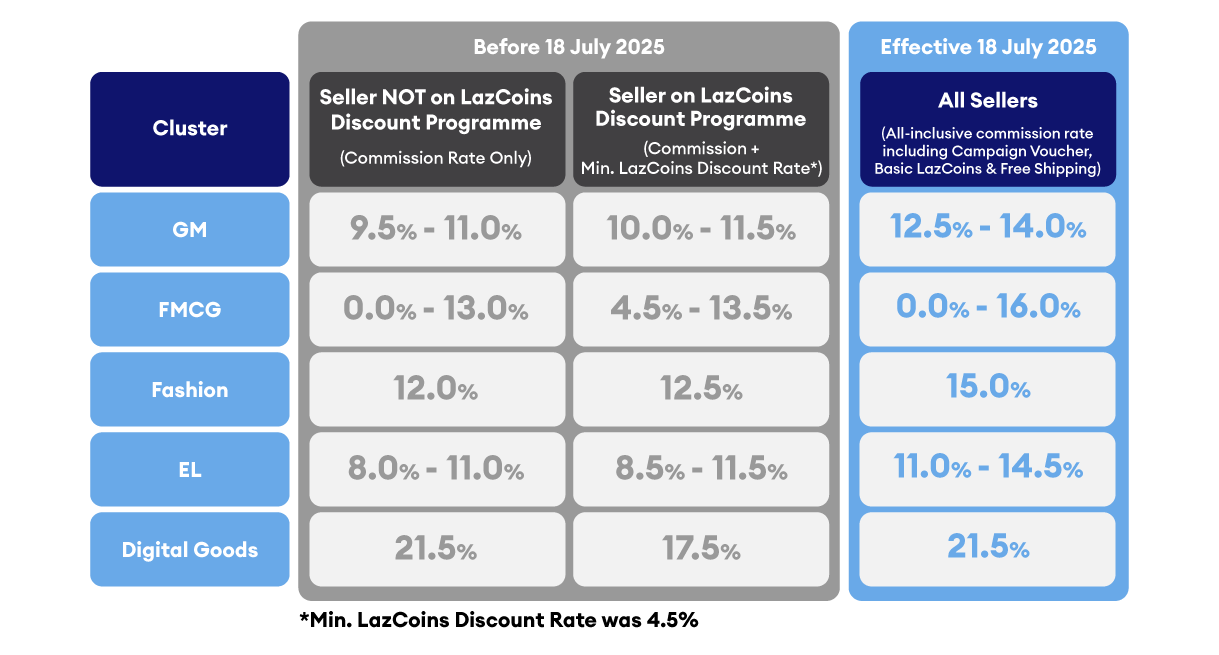
Lazada Malaysia has announced an upcoming change to its LazMall commission structure, effective 18 July 2025 at 12:00 am. This revision affects all LazMall local sellers and brands, introducing an all-inclusive commission rate covering Campaign Vouchers, Basic LazCoins, and Free Shipping.


🔑 New LazMall Commission Rates

https://beebot-sg-knowledgecloud.oss-accelerate.aliyuncs.com/kc/kc-media/kc-oss-1751948652072-LazMall-commission.png


🧾 How Commission is Calculated

The commission will be based on your item selling price after deducting your own promotional discounts. Lazada-funded campaigns and vouchers will not be deducted when calculating commission.


🔧 What Should Sellers Do?

1. Review & Update Product Pricing

To maintain your profit margins after the commission change, review your:

  • Cost price

  • Selling price

  • Promotion strategy

Recalculate your selling price to ensure it covers:

  • The new commission range

  • Your product cost

  • Shipping (if applicable)

  • Desired profit margin


2. Easily Update Prices in Bulk Using Zetpy

Manually adjusting each product’s price can be time-consuming. With Zetpy’s Bulk Price Update feature, you can:

  • Export your LazMall product listings

  • Adjust your pricing in bulk using a spreadsheet

  • Upload the updated file back to Zetpy

  • Sync the new prices to LazMall in just a few clicks

This helps you react quickly to commission changes without the hassle of updating products one by one.


3. Streamline Operations with Zetpy

With rising costs, efficiency matters more than ever. Zetpy helps LazMall sellers to:

  • Automate order syncing to your accounting software (e.g., AutoCount, Xero)

  • Consolidate orders from LazMall and other channels into one dashboard

  • Sync inventory and pricing in real-time across all channels to reduce the risk of overselling and penalty.

  • Spend less time on manual updates and more time growing your business.

👉 Optimize your LazMall store operations today with Zetpy and stay profitable in the changing marketplace.

For more information, you may visit Lazada post here

Should you need any assistance from us, feel free to contact us at support@zetpy.com

Lazada Marketplace Commission Rate Adjustment(Effective 18th July 2025)

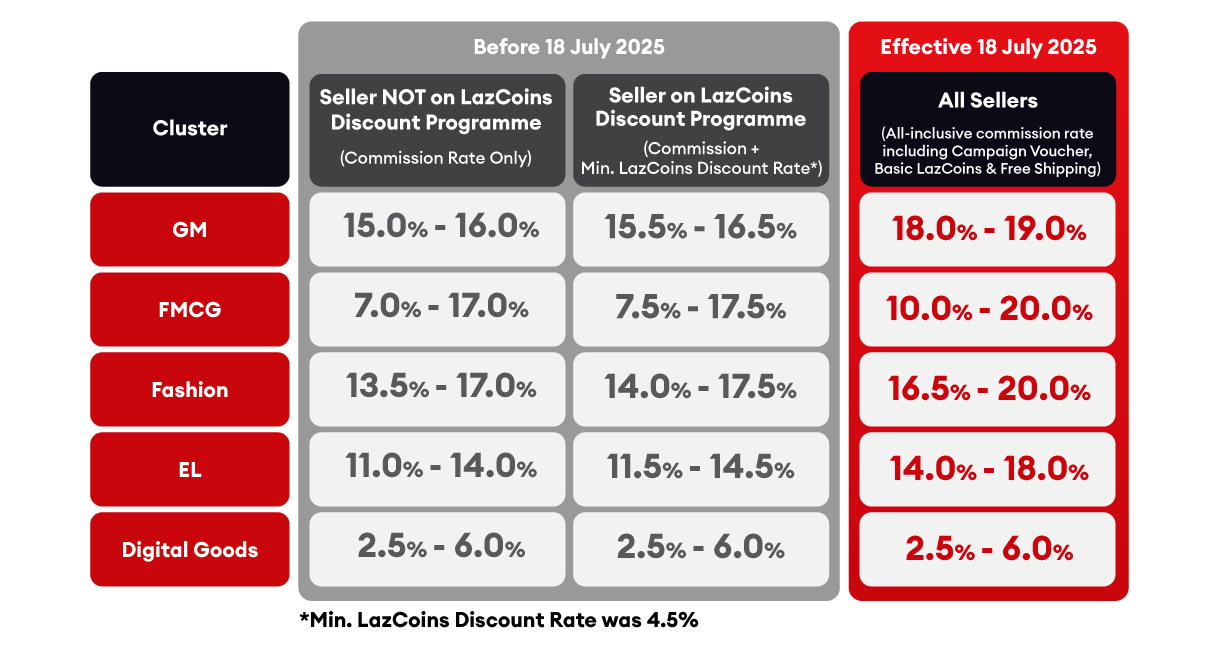
Lazada Malaysia has announced an update to its Marketplace Commission Rates, effective 18 July 2025. This change applies to all Marketplace sellers and introduces a revised, category-based commission structure.

🔑 What’s Changing?

✔️ Revised Commission Rates by Category
Starting 18 July 2025, Lazada will apply all-inclusive commission rates that cover:

– Commission fee

– Basic LazCoins discount program

– Campaign vouchers

– Free shipping contributions

– The commission rates will vary by product cluster

✔️ Commission-Free Period for New Sellers

All new Marketplace sellers will continue to enjoy a 120-day commission-free period when selling on Lazada.
From Day 121 onwards, the standard commission rates will apply.


✔️ SST Applies

All commission fees are subject to 8% SST, in line with Malaysia’s tax regulation (effective since 1 March 2024).


📊 New Commission Rates by Cluster


🧾 How the Commission Fee is Calculated


✅ What Sellers Can Do to Prepare

  • Review your pricing strategy and update if adjustment needed:
    Reassess your product pricing to ensure your profit margins remain healthy after the new commission rates take effect. Utilize our Bulk Price Update feature to mass update your pricing in one go to save time.

  • Plan upcoming promotions carefully:
    With the all-inclusive commission, consider how additional discounts or vouchers will impact your margins.

  • Monitor your seller journey:
    If you’re a new seller, take full advantage of the first 120 days commission-free period to build momentum before the fees apply.

  • Track your category rates:
    Different categories have different commission brackets—keep track of where your products fall.

  • Stay informed:
    Lazada may continue updating platform features. Regularly check the Seller Center for the latest announcements.

For more info, please visit here.