The Omnichannel Command Center: The One Tool Every Growing E-commerce Brand Needs to Scale

When an e-commerce business is starting out, managing multiple channels feels straightforward. You open a storefront on Shopee, launch a TikTok Shop, set up a website, and handle the orders as they come.

But as your brand grows and you begin managing hundreds of SKUs across these different platforms, the cracks start to show. Sticky notes, manual tab-switching, and messy Excel spreadsheets no longer cut it.

If your team is spending hours every day firefighting inventory mismatches, you haven’t just hit an operational bottleneck. You have hit a growth ceiling. To truly scale, your business needs a single source of truth: an omnichannel data platform.

Here is how moving away from manual channel management to a centralized command center protects your margins and unlocks hidden revenue.

Eliminating the “Safe Batch” Trap (Stop Underselling)

When you manage multiple marketplaces manually, the biggest fear is overselling and getting hit with marketplace penalty points. To prevent this, most growing brands resort to a defensive strategy: splitting inventory.

If you have 100 units of a high-demand item, you might artificially split them by allocating 40 units to Shopee, 40 to TikTok Shop, and 20 to your own website.

But marketplace demand is unpredictable. What happens when your item goes viral on TikTok and sells out its 40 units in an hour? Your TikTok Shop now displays “Out of Stock,” turning away eager buyers and killing your momentum. Meanwhile, 60 units of that exact product are sitting idly in your warehouse, locked up for Shopee and your website.

By splitting your inventory to accommodate manual tracking, you are actively turning away revenue.

Pooling Your Stock for Maximum Exposure

An omnichannel data platform acts as a central command center for your brand, completely eliminating the need to divide your inventory.

Instead of treating each marketplace as an isolated island, an omnichannel platform pools your stock. You can confidently list your full inventory of 100 units across Shopee, TikTok Shop, Lazada, and your website simultaneously.

The system automates the heavy lifting in real-time:

  • Instant Deduction: The moment a customer purchases an item on your website, the platform instantly and automatically deducts that unit from your Shopee and TikTok Shop listings.

  • Flawless Accuracy: Your inventory levels across the web are always accurate, removing human error entirely.

  • Zero Overselling Risk: You eliminate the threat of marketplace penalties and canceled orders because the system updates faster than humanly possible.

From Firefighting to Strategic Growth

Think about what your team currently spends its time on. Is it manual data entry, cross-checking stock levels, and downloading fragmented spreadsheets from three different seller centers?

Every hour your team spends on manual backend operations is an hour they are not spending on growing your brand.

By automating your inventory sync through a unified platform, you give your team their time back. Instead of doing tedious data entry, your staff can finally focus on what actually drives revenue: running targeted promotions, optimizing product listings, improving customer service, and scaling your marketing campaigns.

Build a Foundation for Scale

You cannot build a scalable e-commerce enterprise on a foundation of disconnected spreadsheets. True efficiency comes from centralizing your data so your business can handle a massive surge in order volume seamlessly.

If you are ready to stop managing tabs and start expanding your reach across multiple platforms, it is time to move to a unified setup.

Ready to streamline your operations? Book a demo with Zetpy today.

The Hidden Cost of “Doing It Manually”: Why Your Multi-Channel Strategy is Limiting Your Growth

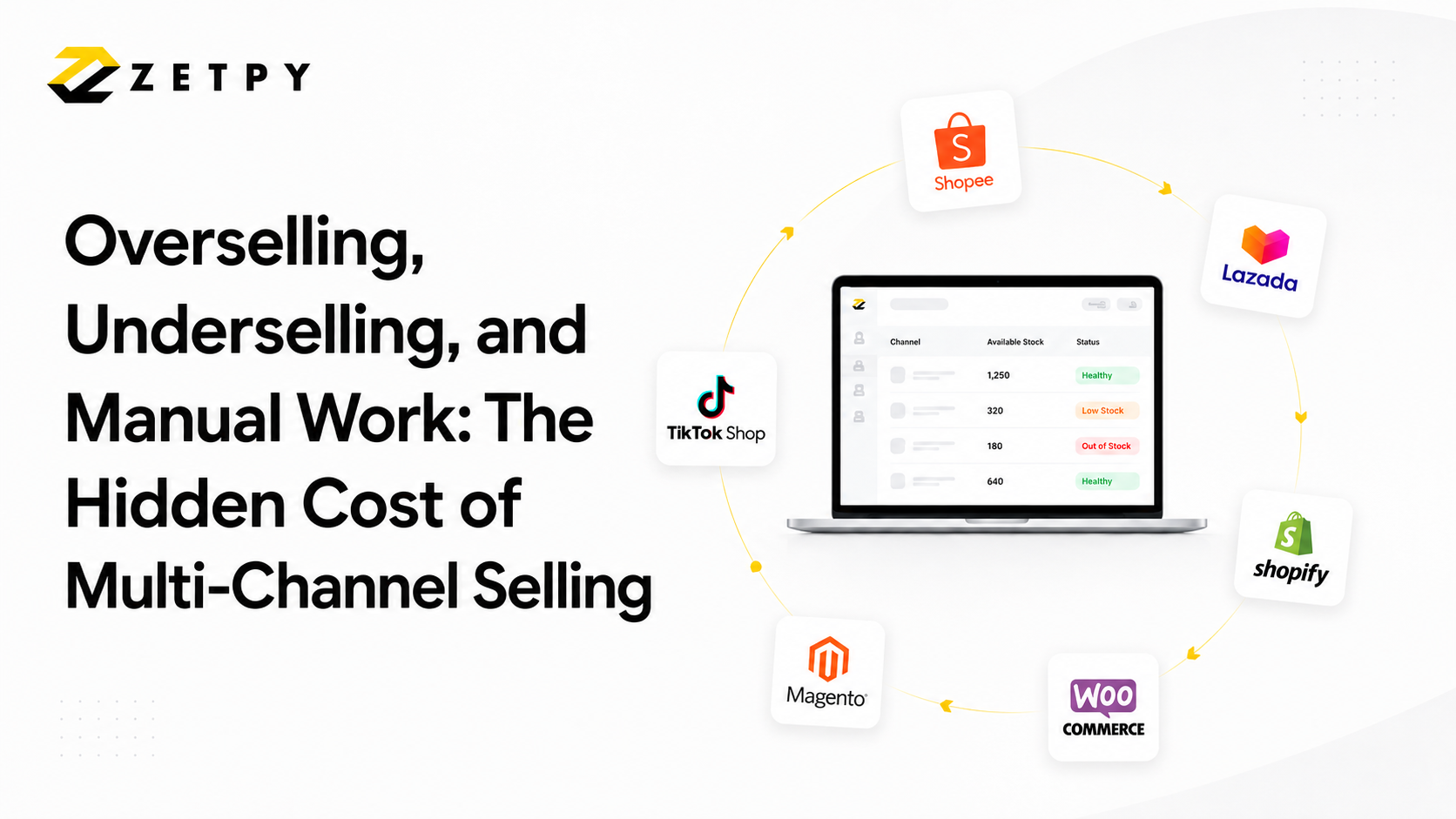
If your brand is selling across Shopee, TikTok Shop, Lazada, Shopify, WooCommerce and Magento, congratulations – you have successfully taking the right step in expanding your business. But if you are still managing the inventory for all those channels manually, you are likely feeling the strain.

For many growing e-commerce brands in Southeast Asia, the backend operations look like this: A customer buys an item on TikTok Shop. Your team then scrambles to log into the Shopee Seller Centre, Lazada Seller Centre, and your website dashboard to manually deduct one unit of stock.

When you are processing 20 orders a day, this is annoying. When you hit 200 orders a day, it becomes a chaotic, error-prone nightmare.

Here is why relying on manual inventory management is actually costing you profit, and how to fix it.

1. The Trap of Overselling (and Seller Penalties)

Human error is inevitable. If a product suddenly goes viral or you run a successful flash sale, your manual processes simply cannot keep up with the order velocity. If you fail to update your stock across all channels fast enough, a customer will buy an item on Shopee that you already sold out of on TikTok.

This leads to the dreaded “oversell.” You are forced to cancel the order, which results in disappointed customers, negative reviews, and severe penalty points from the marketplaces that can throttle your future traffic.

2. The Trap of Underselling (Safe, but Unprofitable)

To avoid the nightmare of overselling, many manual sellers split their stock. If you have 100 units of a product, you might allocate 40 to Shopee, 40 to TikTok Shop, and 20 to your website.

But what happens if that item becomes a massive hit on Shopee and sells out instantly, while the TikTok stock sits untouched? Your Shopee listing shows “Out of Stock,” turning away ready-to-buy customers, even though you technically have 60 units sitting in your warehouse. By playing it safe to accommodate your manual processes, you are artificially limiting your own sales.

3. Wasting Your Most Valuable Asset: Time

Every hour your team spends copying and pasting order numbers, reconciling messy Excel spreadsheets, and clicking through multiple seller centers is an hour they are not spending on growth. Your staff is bogged down in data entry instead of running marketing campaigns, analyzing competitors, or sourcing new products.

The Solution: A Single Source of Truth

You cannot scale an enterprise on sticky notes and manual tab-switching. To break through this operational ceiling, you need to transition from a fragmented multi-channel setup to a unified omnichannel platform.

This is where Zetpy changes the game.

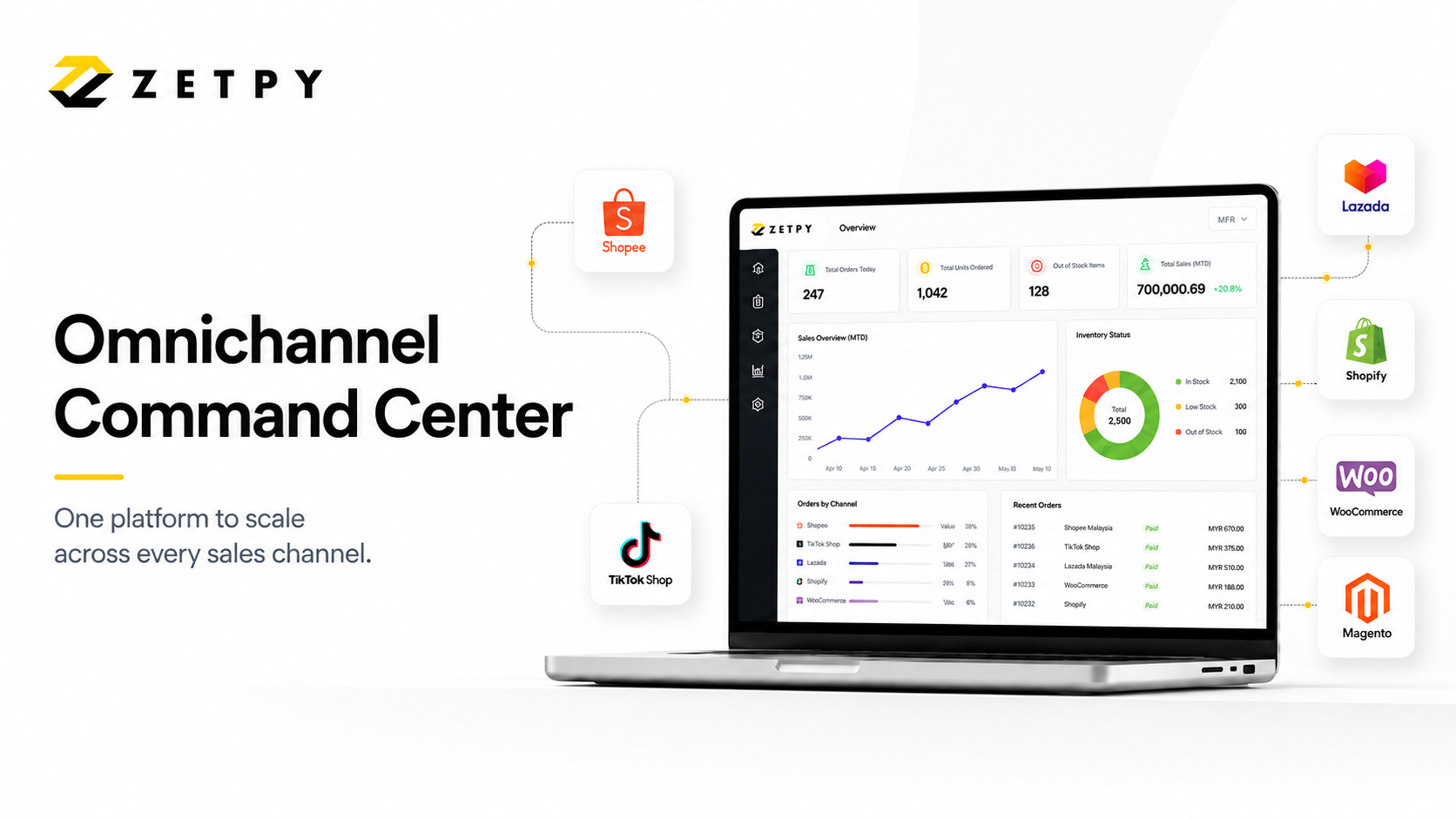
Zetpy acts as the central nervous system for your entire e-commerce business. Instead of logging into four different dashboards, you manage everything from one single, clean interface.

  • Real-Time Sync: When a sale happens anywhere, Zetpy instantly and automatically updates your inventory across everywhere else.

  • Sell Everything, Everywhere: Because the sync is automatic, you no longer need to split your stock. You can confidently list your full 100 units on Shopee, TikTok, Lazada, and your website simultaneously, maximizing your chances of a sale without the fear of overselling.

You built your business to sell, not to do manual data entry. It is time to automate your operations so you can focus on scaling.

Take control of your inventory today. Book a demo to see how Zetpy can streamline your e-commerce operations.

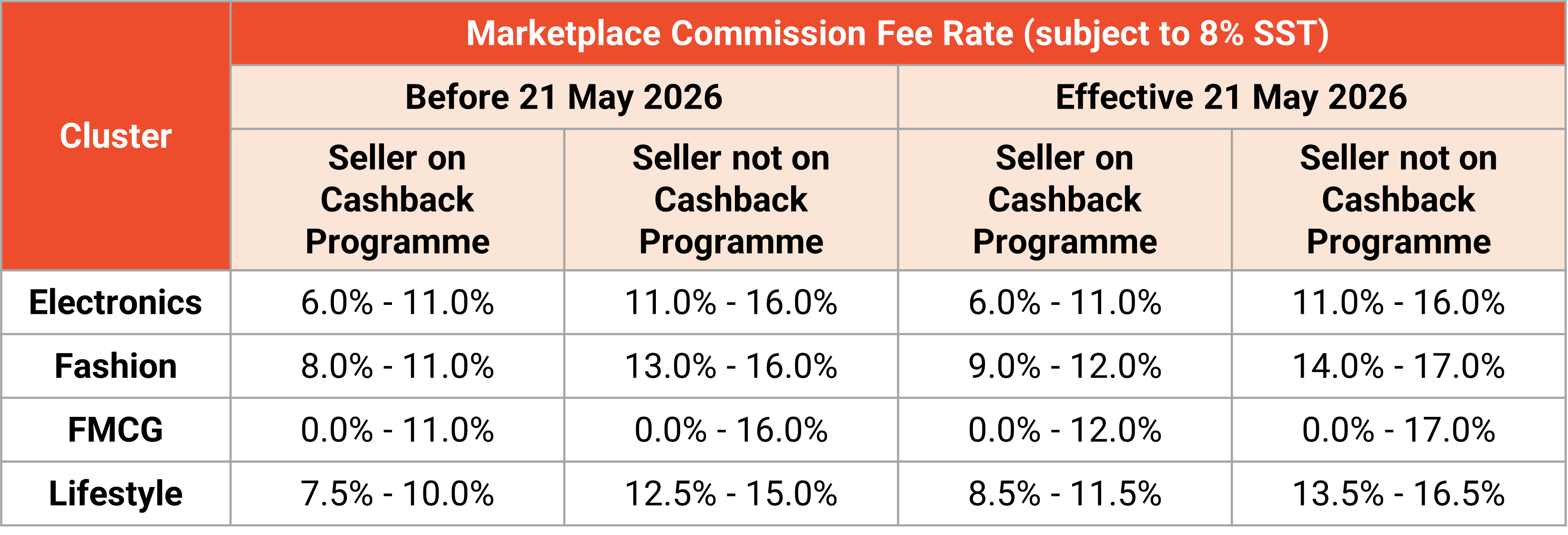
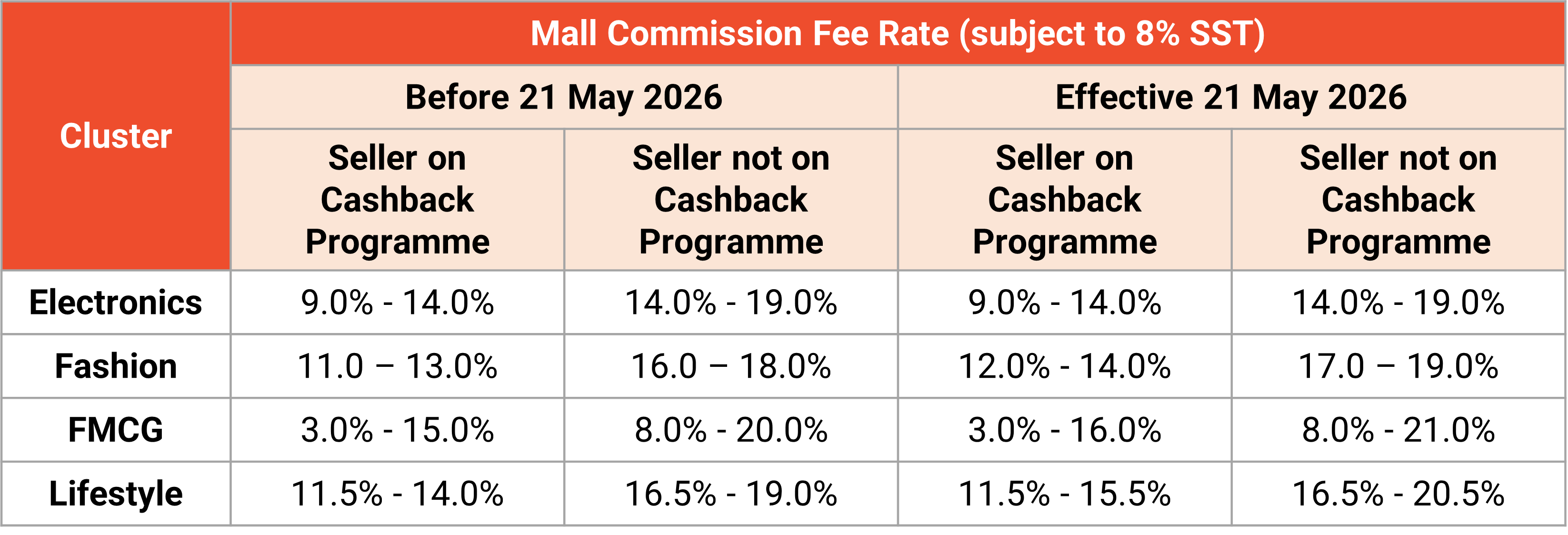
📢 New Shopee Commission Fee Adjustments Effective 21 May 2026

If you are selling on Shopee Malaysia, it’s time to take a quick look at your pricing strategy. Shopee has announced a revision to its Marketplace and Mall Commission Fees, effective from 21 May 2026.

As a Zetpy user, you have the advantage of managing your business from a single dashboard. To maintain your profit margins, you need to be aware of these cost changes and prepare your Shopee listings in advance.

What is Changing?

Starting 21 May 2026, Shopee is updating the commission rates across various product categories. This applies to:

1. Marketplace Sellers (Local non-Mall sellers)

2. Shopee Mall Sellers

Key Highlights:

– Commission Fee: Calculated based on the product price after seller-borne discounts (vouchers/rebates).

– SST: All commission fees are subject to 8% SST.

– Stacked Fees: These new rates are in addition to the existing 2.16% transaction fee and any opted-in service fees (such as Free Shipping or Coins Cashback programmes).


How to Prepare Using Zetpy Bulk Price Update

Manually calculating and changing prices for hundreds of SKUs on Shopee Seller Centre is time-consuming and prone to errors. As a Zetpy user, you can handle this transition seamlessly.

Step 1: Calculate Your New Buffer

With the commission increase, your current pricing strategy might need to change. We recommend calculating a new price buffer that accounts for:

– The new Category Commission Rate

– 8% SST on that commission

– The standard Transaction Fee

Step 2: Use Zetpy’s Bulk Price Update

Don’t wait until May 21st to make changes. You can use Zetpy to update your prices across your Shopee store efficiently:

– Check Your Current Pricing: You will need to check your current pricing and recalculate the new pricing to ensure the new Shopee fees are covered without eating into your net profit before updating the price in Zetpy.

– Sync Prices in Seconds: Instead of entering each listing, use the Zetpy Bulk Update feature to adjust your “Shopee Selling Price.”

– Only want to update your pricing in Shopee? If you sell on multiple platforms (Lazada, TikTok Shop, etc.), Zetpy allows you to set a specific price just for Shopee while keeping your other channels untouched.
Step 3: Factor in New Seller Benefits

If you have just opened a new shop, remember that Shopee grants a fee waiver for the first 120 days or first 100 completed orders. You can use Zetpy to keep your prices competitive during this “honeymoon phase” and then use the Bulk Price Update once you become a seasoned seller.

The Bottom Line

Operating costs in e-commerce are always shifting. The best way to stay profitable is to stay informed and use automation to your advantage. By using Zetpy’s Bulk Price Update, you can adjust to Shopee’s new fee structure in minutes rather than hours.

Need a guide on how to use the Bulk Price Update tool? Check out our tutorial on how to do so.


For the full breakdown of official rates by category, visit the Shopee Seller Education Hub: Marketplace Fees | Mall Fees.

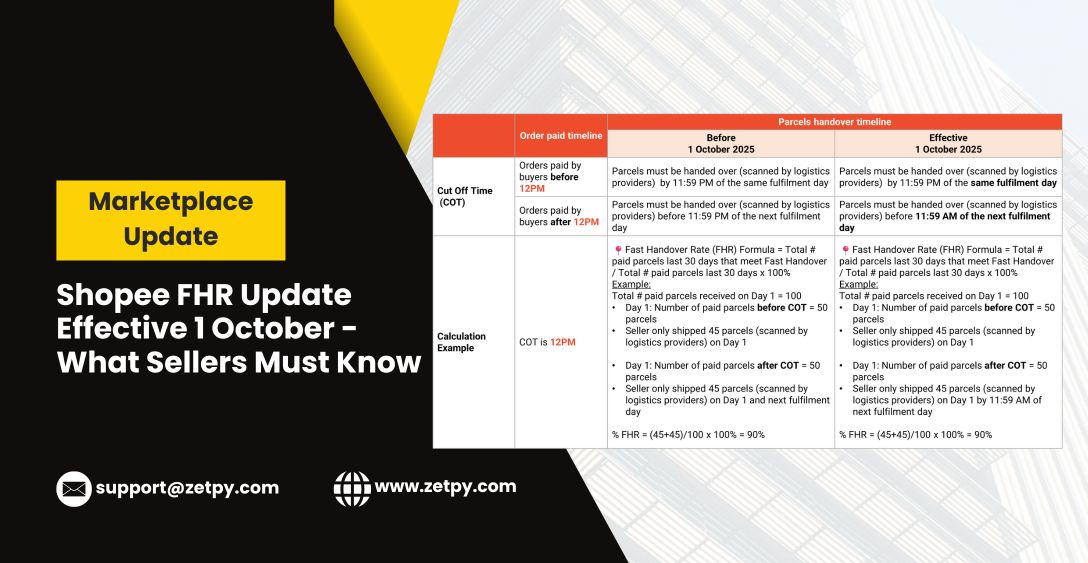
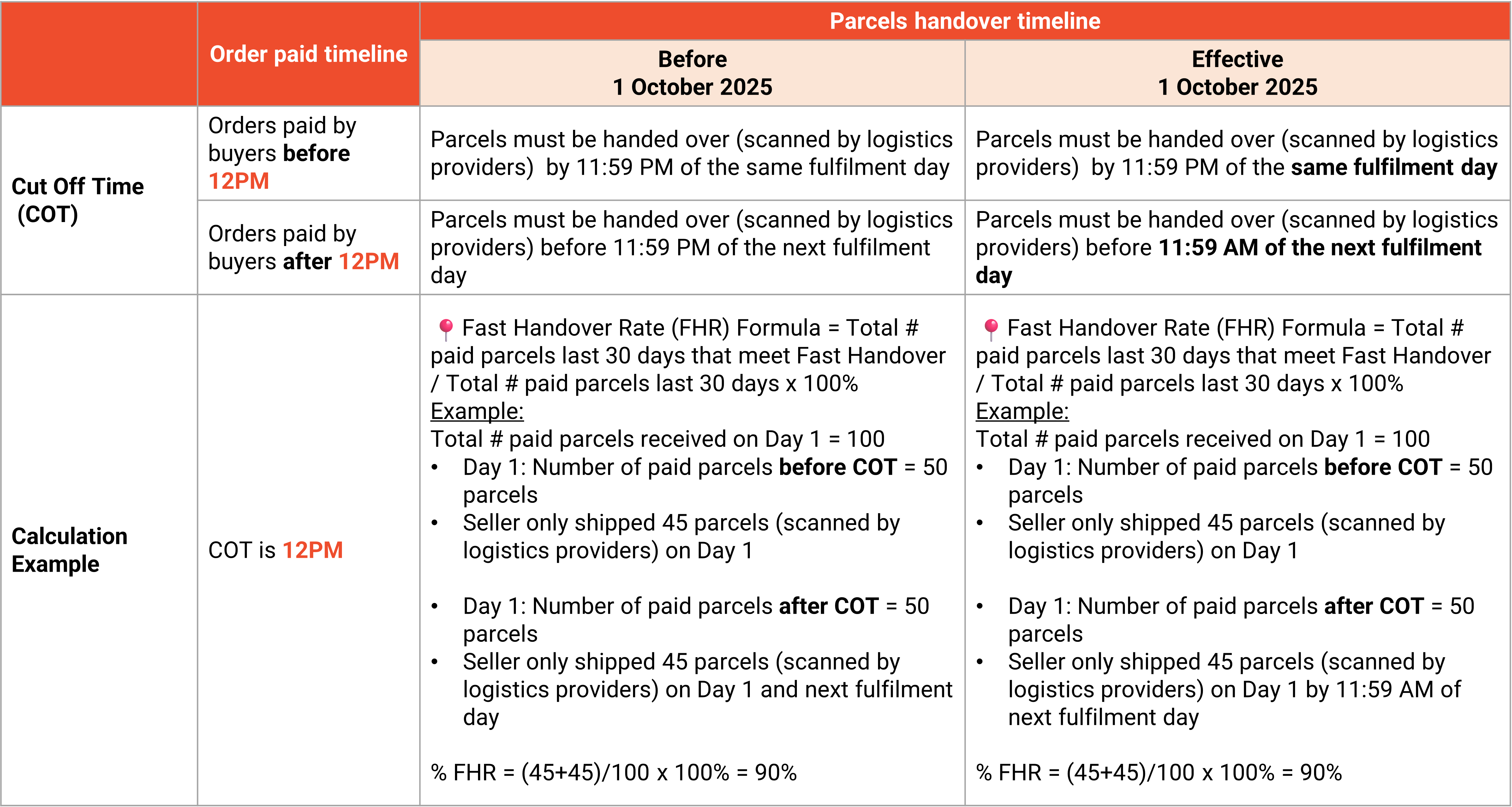
Shopee FHR Update Effective 1 October — What Zetpy Sellers Must Know

Shopee is rolling out a change to its Fast Handover Rate (FHR) requirement starting 1 October. If you’re a seller using Zetpy (or thinking of becoming one), this update has real implications for your operations, your visibility, and your ability to benefit from Shopee’s seller programmes.

Here’s a breakdown:


🔎 What’s Changed in FHR

Shopee’s updated FHR policy means:

  • The required threshold for what counts as “fast handover” is higher or more strictly enforced.

  • Shopee is tightening up handover time windows – i.e. when orders must be handed over to couriers after they’re confirmed. Delays will now more immediately impact your FHR score.

  • More frequent monitoring of FHR. Rather than forgiving occasional delays, Shopee will check performance more often and may penalize sellers who fall below the required rate.

  • Failing to meet the updated FHR can lead to losing benefits, such as preferred seller status, eligibility for campaigns, priority in search or listing exposure.


⚠️ Why This Matters – The Impact for Zetpy Users

For Zetpy sellers, the new FHR rules affect you in several ways:

  1. Risk of penalties for late handover
    If your fulfilment staff or logistics partners delay handovers, even by a little, the stricter FHR can lower your score, which may reduce your store’s visibility or eligibility for Shopee buyer programs.

  2. More pressure to be consistent
    Because Shopee is checking more often, you can’t just play catch-up. Poor performance on a few days may drag your average down.

  3. Importance of stock and order accuracy
    Misplaced inventory, overselling, or order processing delays all contribute to slower handovers. These risks are magnified under the new policy.

  4. Impact on growth & campaigns
    If you lose your badge or fall below Shopee’s performance cutoffs, you might miss out on promotional campaigns, campaign coupons, or preferential listing positions – all of which drive sales.


🚀 How Zetpy Helps You Stay Above Shopee’s New FHR Requirements

The good news? Zetpy is built to help you meet and maintain high FHR standards. Here’s how Zetpy supports you:

Challenge How Zetpy Helps
Delay in order processing All Shopee orders sync properly into Zetpy, so you can see and act on them quickly.
Overselling / inventory issues Zetpy keeps stock levels synchronized across all your channels (Shopee, Lazada, etc.), reducing mismatches that lead to order delays or cancellations.
Tracking and visibility You can monitor order status and ship by time dates directly through Zetpy dashboards so you know arrange accordingly to avoid missing out the deadline.
Consistent performance With faster, more reliable systems, you’re better positioned to consistently meet FHR thresholds.


✅ Key Actions to Take Now

To stay compliant and keep your Shopee shop in strong shape, here are steps to take immediately:

  1. Check your current FHR score in Shopee Seller Centre. Identify how far you are from the new minimum.

  2. Map out your order-handling workflow (from order confirmation to packing to courier handover). Identify weak points or delays.

  3. Ensure inventory is accurate and synced before the 1 October change. Avoid stock outs.

  4. Set internal deadlines – e.g., orders confirmed by noon must be handed to courier same day; ones after cutoff have clear next-day protocols.

  5. Use Zetpy features fully – order sync, inventory sync, dashboard. If you haven’t explored all, now’s a good time.

  6. Monitor weekly – don’t wait till month-end. Watch FHR trends and address dips immediately.


💡 Bottom Line

Shopee’s new FHR rules are designed to push sellers toward faster, more reliable order handovers. For sellers who don’t adapt, the consequences could be visible: lower visibility, loss of perks, or less sales. For Zetpy users who lean into automation, streamlined workflows, and consistent monitoring, this change is an opportunity – to outperform, to qualify for preferred seller programmes, and to build stronger buyer trust.

👉 For more informations, please visit here.

Zetpy Bulk Update Tool Supports Shopee, Lazada & TikTok Shop – Stay Compliant with CPETTR 2024

The Consumer Protection (Electronic Trade Transactions) Regulations 2024 (CPETTR 2024) by the Ministry of Domestic Trade and Cost of Living (KPDN) aims to strengthen online consumer protection. It applies to all online sellers in Malaysia, including those on Shopee, Lazada, TikTok Shop, and more.

Originally set for enforcement on 24 June 2025, CPETTR requires:

  • ✅ Disclosure of seller information

  • Product titles and descriptions in Bahasa Melayu

  • ✅ Submission of valid product certifications


[Update] Malay Language Requirement Temporarily Paused

As of 23 June 2025, KPDN has paused the enforcement of the Bahasa Melayu requirement for product listings across all e-commerce platforms.

According to Malay Mail, the ministry will now:

– Gather feedback from platform operators and sellers

– Reevaluate how the policy should be implemented

– Announce a revised timeline after consultations


Zetpy still encourages all sellers to begin preparations early while awaiting the next announcement.


Introducing Zetpy’s Bulk Update Tool – Now Live for Shopee, Lazada & TikTok Shop!

To help sellers stay compliant efficiently, Zetpy has rolled out a Bulk Update Tool that lets you quickly edit product titles and descriptions in Bahasa Melayu across multiple platforms. You may refer to the guide below on how to ultilize them in repective platforms.

Tiktok Shop

Shopee

Lazada

Why You Should Still Act Now

Even with the BM listing requirement on hold, it’s wise to prepare early:

– Be ready once enforcement resumes

– Save time by completing bulk updates now

– Avoid last-minute rush or non-compliance risks

Zetpy’s Bulk Update Tool is the fastest way to manage large inventories across multiple platforms.


What You Can Do Now

  1. Export your listings from Shopee, Lazada, and TikTok Shop via Zetpy

  2. Fill in the product name and details fields while the update window is flexible

  3. Stay tuned for further announcements from KPDN


Zetpy – Focus on selling, we’ll help with the compliance bit..

If you need assistance or want to learn how to use the Bulk Update tool, feel free to contact us via email at support@zetpy.com

Important: Shopee’s Data Protection Policy

Dear Valued Customers,

As a Shopee Service Partner and ISV Developer, Zetpy is required to comply with the Shopee Open Platform Partner rules, including the Shopee Open Platform Data Protection Policy.

Key points of this policy, particularly Clause 10.6 and 10.7 (under Section 10: Storage, Handling, and Disposal), are as follows:


Clause 10.6: “You shall not retain or store any Personal Data and Restricted Data (including but not limited to the Customer Name, Phone Number, Email Address, and Address) that is subject to this DPP for any period of time longer than is necessary to serve the purposes of this Agreement (which, in any event, shall be no longer than ninety (90) days, subject to applicable law). Thereafter, all data should be disposed of in accordance with Clause 10.7 below.”


Clause 10.7: “You will dispose of the relevant Protected Data when it is deemed no longer necessary to continue being preserved, or has exceeded industry best practices for the time/duration/age of the Protected Data. Protected Data should be disposed of in a method that prevents any recovery of the data in accordance with industry best practices for shredding of physical documents and wiping of electronic media. You will destroy any equipment containing Protected Data that is damaged or non-functional. All Protected Data must be rendered unreadable and unrecoverable regardless of the form (physical or electronic).”


For more details, please refer to Shopee’s full Data Protection Policy below:
https://open.shopee.com/developer-guide/32


Immediate Changes on Zetpy Inventory Platform:

Effective immediately, merchants will no longer be able to access or recover order data (including but not limited to Customer Name, Phone Number, Email Address, and Address) that is 90 days or older.

For any inquiries or assistance, please contact us at support@zetpy.com

Thank you for your attention and understanding.


To learn more about the Shopee Open Platform Partner Rules:
https://open.shopee.com/developer-guide/34

#ShopeeOpenPlatform
#DataSecurityPolicy
#ZetpyInventory
#OmnichannelSelling

How to Sell on Shopee Malaysia – Updated on July 2024

How to Sell on Shopee 2024

Are you new to selling online, especially on e-marketplaces? Shopee is an excellent platform to consider due to its ease of use and wide reach. Here’s a comprehensive guide to help you get started and succeed on Shopee Malaysia.

Why Choose Shopee?

Shopee’s mobile-first approach and user-friendly interface make it a top choice for both buyers and sellers. It remains the most popular e-commerce app in Malaysia, ranking highly on both the Apple App Store and Google Play Store.

Who Can Sell on Shopee Malaysia?

Shopee welcomes a diverse range of sellers, creating an inclusive and vibrant marketplace. Whether you’re an individual or a business, Shopee has a spot for you:

Individuals: Aspiring sellers with valid Malaysian identification can register as individual sellers. This allows you to explore entrepreneurial ambitions, showcase unique products, and grow your business.

Businesses: Registered companies in Malaysia are encouraged to join Shopee, providing opportunities to reach a broad customer base, enhance brand visibility, and drive sales growth.

Types of Sellers on Shopee Malaysia

Shopee Malaysia offers several types of seller accounts to cater to different levels of sellers, each with its own set of criteria and benefits. Here’s a breakdown of the different seller types:

  1. Normal Seller
  • Who They Are: This category is open to everyone, including individuals and businesses.
  • What They Sell: Normal sellers can sell their own brands or resell other brands (new or used).
  • Criteria: No minimum criteria required to start selling.
  • Benefits: Access to the basic tools and features provided by Shopee for managing listings and orders.
  1. Preferred Seller
  • Who They Are: Preferred sellers are selected by Shopee based on their performance and service quality.
  • Criteria:
    • Unique buyers in the last 30 days: ≥ 35
    • Net orders in the last 30 days: ≥ 75
    • Chat response rate: ≥ 85%
    • Shop rating (all-time): ≥ 4.7
    • Current number of seller penalty points: ≤ 1
    • Product authenticity: 100%
  • Benefits:
    • Preferred seller badge and “Shopee 100% Authentic Guarantee” tag.
    • Access to Shop Ads.
    • Visibility in the Preferred seller filter.
    • Extra Shopee-sponsored vouchers during big campaigns​
  1. Preferred+ Seller
  • Who They Are: Top-performing Preferred sellers.
  • Criteria:
    • Chat response rate: ≥ 95%
    • Shop rating (all-time): ≥ 4.8
    • Late shipment rate: ≤ 10%
    • Non-fulfillment rate: ≤ 5%
    • Net orders in the last 30 days: ≥ 75
    • Unique buyers in the last 30 days: ≥ 35
    • Product authenticity: 100%
  • Benefits:
    • Exclusive Preferred+ badge.
    • Up to 15% discounts on Shopee Ads top-ups.
    • Early access to new Shopee features​
  1. Shopee Mall Seller
  • Who They Are: Brand owners and official distributors.
  • Criteria:
    • Must be invited or apply and meet Shopee’s stringent criteria for brand authenticity and service quality.
    • Provide 100% authenticity, 15 days return, and free shipping on orders above a certain amount.
  • Benefits:
    • Shopee Mall or Mall badge.
    • Access to a larger audience and promotional opportunities.
    • Higher trust and visibility among customers​

Guide to Sell on Shopee Malaysia

Step 1: Sign Up

Go to https://shopee.com.my/, click “Sign Up” on the top right to register for a Shopee account.

Step 2: Create an Account

Fill in your phone number and click ‘next’ to receive a 6-digit code via SMS for verification purpose. Alternatively, you can choose to sign up with Google or Facebook. 

Step 3: Verified Account

Verified your number and setup the password

Step 4: Go to Seller Centre

Once the password is created, go to Shopee Home Page and click “Seller Centre” on the top left of the page or visit seller.shopee.com.my/account/signin.

Step 5: Seller Registration

To get started, you need to register as a seller by providing the necessary information.

Step 6: Choose The Right Seller Type

There are 2 types of sellers, prepare the information needed before filling up Seller Information on this page:

Individual Seller: to provide valid personal identification documents during your application, such as IC number, copy of IC, Tax Identification Number (TIN)

Registered Business Seller:  to provide valid business documents during your application, such as Business Registration Number (SSM), upload registration of Business (SSM Cert/ Borang 9), TAX Identification Number (TIN), SST Number (if you have registered).

Step 7: Setup Shop Info

Next to setup your Shop Information, shop’s name must be unique.

Step 8: Shipping Channel

Choosing the right shipping channel is crucial for providing a seamless shopping experience on Shopee Malaysia. The recommended shipping channels and settings for optimizing your shipping process.

The shipping channel details.

Step 9: Shop Info Submitted Successfully

Once the necessary info is submitted successfully, you can proceed to add your first product on your Shopee shop.

Step 10: Add Product

Shopee new product listing feature will guide you step by step to complete a product listing.

Check more about product listing via this link

https://seller.shopee.com.my/edu/category?sub_cat_id=34

The different between 1:1 image and 3:4 image as below:

Step 11: Completed 1st Product Listing and Go to Seller Centre

After completing your first product listing, Shopee will direct you to your Shopee Seller Centre, this is where you can manage your order, product, marketing, customer service, finance (income, balance & bank account), data (Insights) and your shop information.

Step 12: Bank Account

Never forget to add your bank account to receive income from Shopee.
Go to Finance > Bank Accounts for the setting.

Congratulations! You are ready to sell on Shopee.


Shopee Announces Changes to Commission and Transaction Fees Effective on 1st August 2024

E-commerce giant Shopee has recently announced adjustments to its commission and transaction fee structure, impacting sellers across its platform. These changes are set to take effect on 1st August 2024.

Changes of Shopee Marketplace Commission Fee

Commission Fee Adjustment Shopee will be increasing its commission fees for certain product categories. The new rates are as follows:

Changes of Shopee’s Transaction Fee

Effective 1 August 2024, Shopee’s Transaction Fee will be revised to 3.5% (not inclusive of 8% SST).

The e-commerce landscape is constantly evolving, and fee adjustments are a regular occurrence across platforms. By staying informed and adaptable, sellers can continue to thrive in the dynamic world of online retail.

Sources:

Marketplace commission fee: https://tinyurl.com/2ct57yyv 

Shopee’s transaction fee: https://tinyurl.com/4zve5jzd

Unleash Omnichannel’s Profit with Zetpy x Xilnex at the Franchise Expo Malaysia 2024! 11-13 July 2024 @ Kuala Lumpur Convention Centre


Join us at the Franchise Expo Malaysia from 11-13 July at the Kuala Lumpur Convention Centre! 

Discover how Zetpy Solutions integrates with Xilnex POS to provide end-to-end omnichannel solutions that will grow your business – all under one control panel.

Zetpy Inventory – Sync with Xilnex POS


  • 🌐 More Sales Channels: Automatically sync inventory from Xilnex to Lazada, Shopee, TikTok Shop, Zalora, WooCommerce, Shopify, and Magento.

  • 🔄 Auto Sync Sales Orders: Automatically create invoices or sales orders in Xilnex for every online order

  • 🏬 Click & Collect*: 47% of Online Shoppers often buy additional products when picking up their orders in-store. (PYMNTS, 2022)

More Features:


Zetpy Omni – Unifying eCommerce App, Web & Loyalty with Xilnex POS


  • 📊 Grow Customer Database: Capture customer data from both online and offline transactions to boost engagement and repeat sales from members.

  • 📱 Mobile-First Experience: The simplest, most intuitive way for customers to sign up, log in, and shop.

  • 🎁 Loyalty Program: Reward points for shopping online and offline, synced with Xilnex Loyalty Points. Customers easily redeem points for vouchers to buy online or offline.

A lot more features like Digital Receipts, eWallet, Member-Tiers, eGiftcard etc to enable seamless experience for your customers.


See the future of retail firsthand and learn how Zetpy can elevate your business. 

Visit our booth at:

📅 Event Details:

  • 📆 Dates: 11-13 July 2024
  • 📍 Location: Kuala Lumpur Convention Centre
  • 📌 Booth: 1F01, 1F02, 1F03, 1F08, 1F09 & 1F10, Hall 1