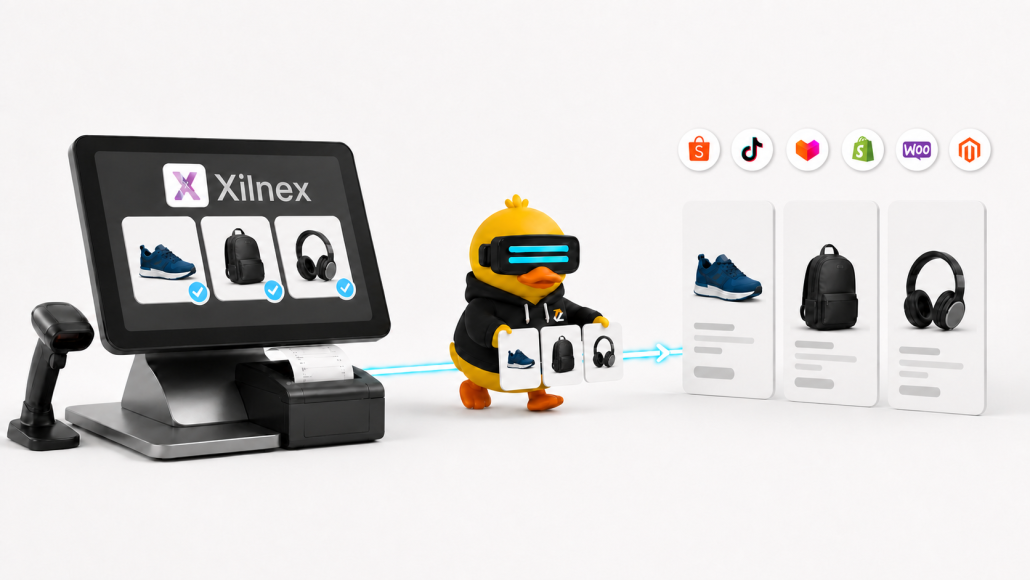
A product may already be complete in Xilnex, with its item code, price, stock and image ready. Relisting that same item for Shopee, TikTok Shop, Lazada or another online channel adds work that your team should not have to repeat.
Zetpy provides a more practical route. You can sync selected products from Xilnex into Zetpy, prepare them for online selling and publish them to your connected sales channels.
When customers place orders online, those orders can be sync from Zetpy to Xilnex as Sales Orders or Sales Invoices.
Start with the products you actually want to sell online
Most retailers do not need their entire POS catalogue online.
Some products may only be available in-store. Others might not have suitable packaging, images or delivery options yet. If your Xilnex catalogue contains thousands of items, importing everything would only create more products for your e-commerce team to sort through.
Zetpy lets you import selected Xilnex items. This means your team can start with the products that are ready to sell and add more later.
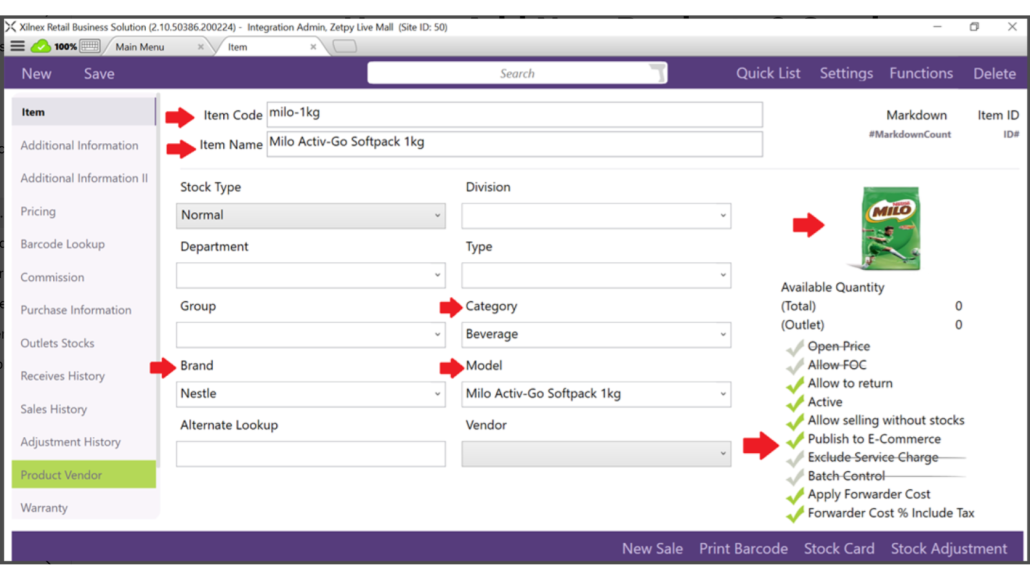
Before an item can be imported, check that it is active in Xilnex and that Publish to E-Commerce has been enabled. The product must also have an item code and item name.
The item code matters because it should match the SKU used by your marketplaces and online stores. A consistent SKU helps Zetpy identify the same product across different systems.
What comes across from Xilnex?
Depending on the information available in Xilnex, the import can include:
- Item code and item name
- Model
- Category and brand
- Product description
- Sales price
- Weight and dimensions
- Product image
You do not need to wait until every field is perfect. The item code and item name are the minimum requirements, while other details can be completed in Zetpy.
That said, it is worth preparing as much information as possible in Xilnex first. A product with a clear name, correct price, useful description and suitable image will need less work after the import.
Zetpy currently supports the import of eligible NORMAL, PREPACK and POSTPACK products, subject to the relevant Xilnex settings and version requirements. You can review these requirements in Zetpy’s Xilnex product import guide.
Choose which Xilnex price to use
A retailer may use one price at the counter and another online. That is normal, especially when marketplace fees, delivery costs or online promotions are involved.
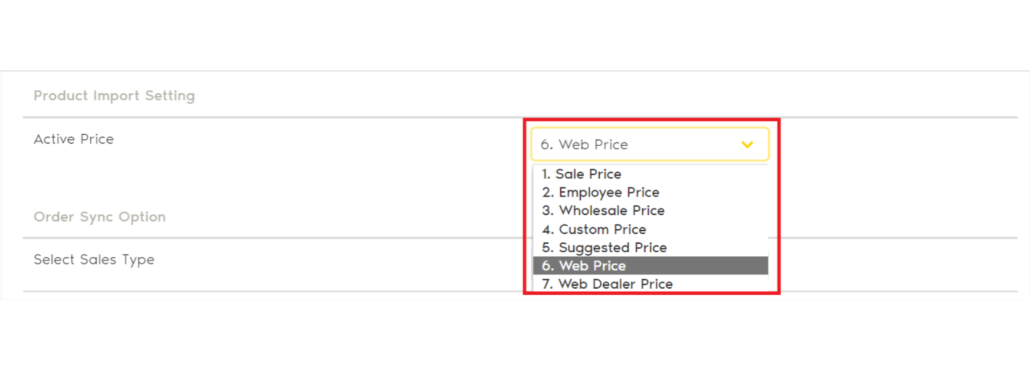
Xilnex supports several price types. During the Zetpy setup, you can choose which one will be used for the initial product import.
Once the item is in Zetpy, you can review and change its selling price before adding it to a marketplace or webstore.
One detail deserves attention here: the price is imported from Xilnex during the first product import. If you later change that price in Xilnex, it will not automatically overwrite the product price already stored in Zetpy. Your team should therefore decide where online prices will be maintained after the initial setup.
Prepare each product for its online channel
Importing a product does not automatically mean it is ready to publish.
A POS system and a marketplace use product information differently. Xilnex may already contain everything your retail team needs, but Shopee or Lazada could require an online category, shipping dimensions, product attributes or variation details.
After importing an item, open the Zetpy Products page and check:
- Is the product title clear to an online shopper?
- Does the description explain the important features?
- Are the images suitable for a marketplace listing?
- Are the weight and parcel dimensions correct?
- Is the online selling price correct?
This is also where you can improve a short POS item name. Something like “Kettle 1.7L BLK” may work for a cashier, but an online shopper would understand “1.7L Electric Kettle, Black” more easily.
Add the product to your connected online marketplace or webstore
Once the listing details are ready, you can add the product to a supported sales-channel plugin in Zetpy.
Depending on your Zetpy subscription and account setup, the Xilnex integration can be used with channels such as Shopee, TikTok Shop, Lazada, Zalora, Shopify, WooCommerce and Magento. Make sure that the online channels that you want to sell the item on is authorized with Zetpy before planning a rollout.
Keep Xilnex as your stock reference
A product listing is only useful when its stock is accurate.
If an item sells at your physical store, the quantity changes in Xilnex. With Zetpy’s Xilnex integration, Zetpy will then detect the stock changes and sync to the updated inventory to connected online channels.
This helps reduce the amount of manual stock updating required from your team. It can also lower the risk of accepting an online order for an item that has already sold in-store.
For this workflow, stock should be managed from Xilnex. A quantity entered directly in Zetpy may update the connected marketplaces, but it will not update the stock in Xilnex.
Keeping one clear inventory source avoids situations where different team members maintain different quantities in different systems.
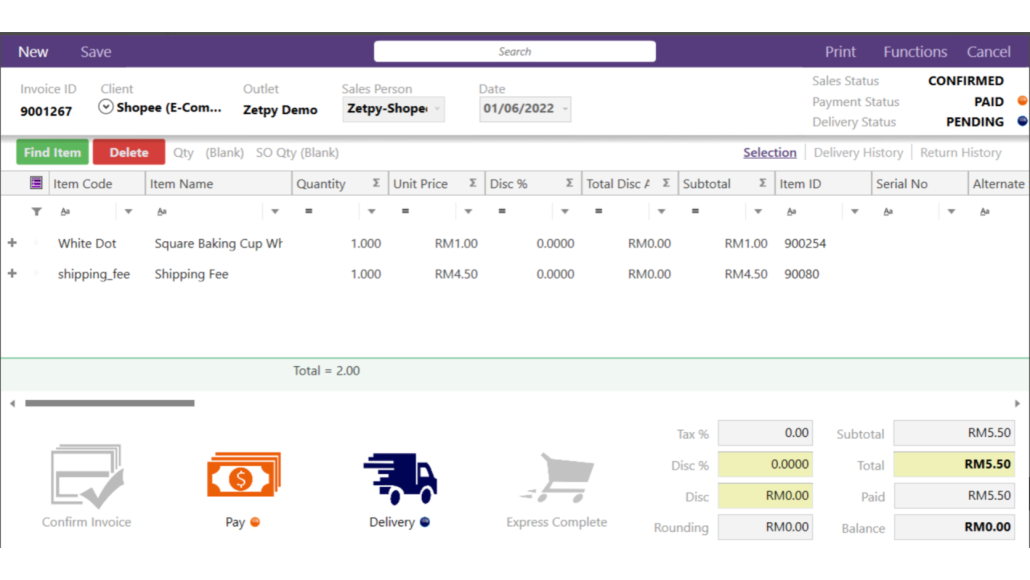
What happens when an online order arrives?
The integration is not limited to products and stock.
Orders from connected marketplaces and webstores can enter Zetpy and then be sent to Xilnex. You can choose whether they should be created as:
- Sales Orders, which do not deduct stock in Xilnex
- Sales Invoices, which deduct stock in Xilnex
The right option depends on how your business handles payment, fulfilment, stock and e-Invoice submission.
For example, a business that wants to confirm an order before completing the sale may prefer to begin with a Sales Order. Another retailer may create a Sales Invoice once the marketplace order reaches a specific status.
Zetpy supports both manual and automatic order-import workflows. If you choose automatic importing, you can select the order status that should trigger the transfer to Xilnex. If you prefer more control, your team can review and select orders manually.
Order details transferred to Xilnex can include the buyer’s information, purchased SKU, online order reference and sales channel. The resulting Xilnex Sales ID can then be viewed in Zetpy.
See Zetpy’s Xilnex order sync guide for the current configuration steps and required item codes.
A simpler path from the brick-and-mortar to online selling
Moving online should not mean recreating your online product catalogue from zero.
With Zetpy and Xilnex, you can choose the products that are ready for e-commerce, import their existing information and complete the marketplace-specific details in Zetpy. Stock changes can move from Xilnex to your connected channels, while online orders can return as Sales Orders or Sales Invoices.
For retailers managing both physical and online sales, that creates a much cleaner daily routine.
Want to connect Xilnex to your online sales channels?
Speak with us today about your current product, inventory and order workflow. Our team can help you identify the right setup for your retail and e-commerce operations.
Frequently asked questions
Can I import only selected Xilnex products?
Yes. Zetpy supports importing specific eligible items instead of requiring you to import your entire Xilnex catalogue.
Which details are required?
An item must be active, enabled for e-commerce publishing, and have an item code and item name.
Can I change the product information after importing it?
Yes. You can edit its online title, description, price, images and other listing information in Zetpy before publishing to your online channels..
Can online orders be sent back to Xilnex?
Yes. Eligible online orders can be sent from Zetpy to Xilnex as Sales Orders or Sales Invoices, based on your settings.