Get Your Online Listings Ready Faster with Zetpy AI Product Descriptions
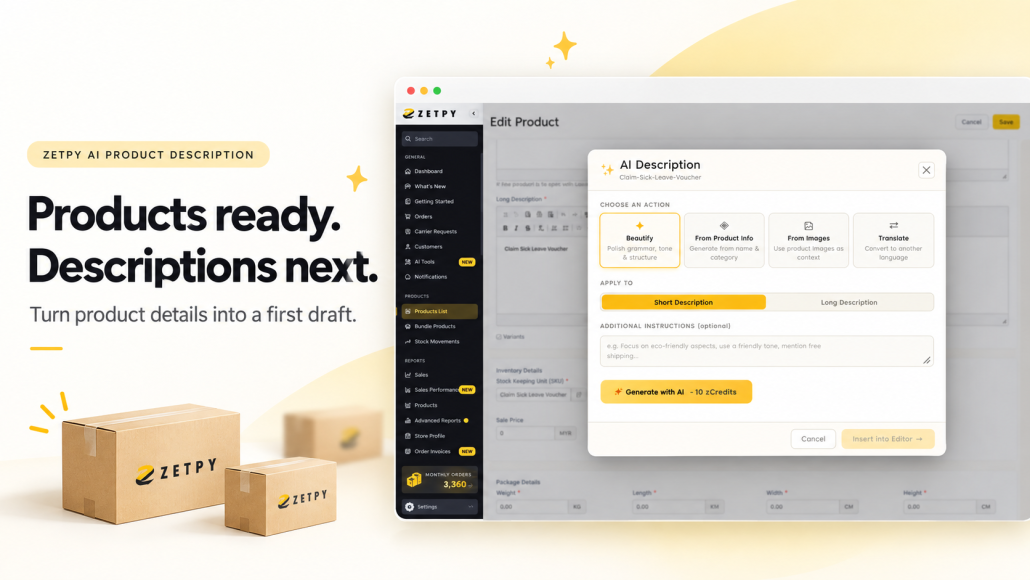
Products ready, but still stuck on the descriptions?
The stock has arrived, the photos are done, and you’re almost ready to list. There’s just one thing left: turning the supplier’s product details into something your customers can actually understand.
It sounds like a small job. Until you have a whole batch of products waiting and orders to get out the door.
So the descriptions get left for later. Or someone writes them in a rush, copying a few specifications and hoping that’s enough.
The trouble is, customers may still have questions. Will this fit? What’s it made of? Does it come with the accessories in the photo? If the description doesn’t tell them, they have to ask, guess or keep looking.
Zetpy AI Product Description helps you get a first draft together inside the product editor, so you have something to work with when you sit down to finish a listing.
Start with what you already have
You don’t always need to write a description from scratch. Sometimes the information is there, but it’s buried in a long paragraph or written in awkward English.
Choose the option that fits the job:
- Beautify: Tidy up an existing description’s wording, grammar, tone and structure.
- From Product Info: Create a draft using details such as the product name and category.
- From Images: Use your product images as context for a draft.
- Translate: Create a version in another language.
You can choose a short or long description and add instructions about the tone or details to focus on. Once the draft is ready, review it, insert it into the editor and make your final changes before saving.
The AI Product Description tutorial walks you through the steps.
A few useful details make a better starting point
Before you generate anything, think about what you’d want to know if you were buying the product.
Take a storage box. “Great for keeping your home organised” sounds fine, but it doesn’t tell a customer whether it will fit on their shelf or whether the lid is included.
The dimensions, material and package contents help answer those questions. Gather whatever you can confirm from the supplier’s information, then use those facts to guide the draft.
Your instruction can be simple:
Write in simple English. Start with a short introduction, followed by bullet points for the specifications. Use only the details provided, and don’t add extra features.
There’s no need to come up with a clever prompt. Be clear about what you want the customer to know.
If something is missing from the supplier document, check it before adding it to the listing. That saves your team from having to correct it later.
Work through a few listings at a time
Rewriting the whole catalogue is a big task to squeeze into an already busy week.
Start with the products that need attention first. That might be new arrivals waiting to go live, older listings with barely a sentence of information, or products that keep getting the same customer questions.
Those questions are useful clues. If people regularly ask whether a cable is included, make the answer easy to find in the description.
For similar products, agree on a basic structure your team can follow. A short introduction, key features, specifications and package contents may be enough. Use the sections that help explain the product.
This also makes reviewing easier. Everyone knows where to put the measurements and where to check what comes in the box.
Read the draft with the product details beside you
A draft can read well and still get a detail wrong.
Before saving, compare it with the information you’ve confirmed. Check sizes, materials, compatibility, included items and any claims about what the product can do.
Be especially careful when generating from images. A photo may show the shape or colour, but it won’t reliably tell you the exact material, capacity or performance.
For translations, check that the meaning and product terms are right. A sentence can be grammatically correct and still describe the wrong thing.
Then give the description one last read as a customer. Is the information easy to find? Does anything sound vague? Could you remove a sentence without losing anything useful?
Often, a shorter, clearer description is all the listing needs.
Get the next few listings finished
Pick a few products that have been waiting for descriptions. Gather their details, generate the drafts and review them before saving.
As you work through them, you’ll get a better sense of where your team needs help, whether that’s getting the first version written, cleaning up supplier wording or preparing another language version.
If product content is holding up your next launch, tell us where you’re getting stuck. We can show you how Zetpy AI Product Description fits into your listing process.