How to Reduce Order Fulfilment Errors During Busy Sales Periods
Major sales campaigns can bring hundreds or even thousands of orders within a short period. While higher sales are good for business, the sudden increase in workload can put your fulfilment team under pressure.
When processes are unclear, employees may pick the wrong item, pack an incomplete order, print the wrong shipping label, or miss the shipping deadline. These mistakes can lead to cancellations, refund requests, poor reviews, and marketplace penalties.
The solution is not simply to ask your team to work faster. You need a clear fulfilment process that helps employees complete every order accurately, even when order volumes increase.
Here is how sellers can strengthen their picking, packing, and order-status processes before the next busy sales period.
Why do fulfilment errors increase during sales campaigns?
During a normal business day, your team may have enough time to check each order carefully. During a double-digit sale, payday campaign, flash sale, or festive promotion, several things happen at once:
- New orders arrive continuously from different sales channels.
- Warehouse employees must pick and pack more orders during sales day.
- Marketplace shipping deadlines become more difficult to track in multiple platforms.
- Customer enquiries increase as buyers check their order status.
If your employees rely on memory, spreadsheets, handwritten notes, or several marketplace dashboards, small mistakes can quickly become larger operational problems.
A standard order fulfilment workflow gives your team clear instructions from the moment an order is received until the parcel is handed to the courier.
1. Bring orders into one clear processing queue
When you sell through Shopee, Lazada, TikTok Shop, Shopify, and other channels, orders may arrive in several different seller dashboards.
Switching between platforms makes it easier to miss orders or process the same order twice. It can also be difficult for managers to see the total number of orders waiting to be fulfilled.
A better process is to bring orders from your connected channels into one central system. Your team can then filter orders based on:
- Order status
- Marketplace or seller account
- Shipping deadline
- Courier or shipping provider
- Whether shipping documents have been printed
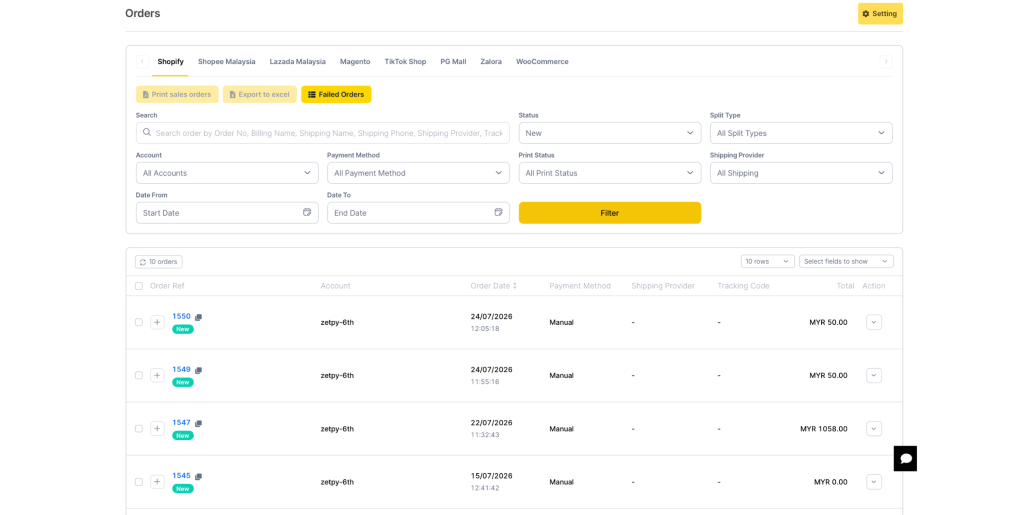
Zetpy brings orders from supported marketplaces and webstores into one dashboard. Sellers can filter their orders by criteria such as status, account, print status, ship-by date, and shipping provider. This gives the fulfilment team a clearer view of what needs to be processed first. Learn about Zetpy’s multichannel order management.
2. Use a pick list instead of picking from memory
Picking is the process of collecting products from their storage locations for an order. Many incorrect shipments begin at this stage.
A product name alone may not be enough to identify the correct item. Different variations can look similar but have different colours, sizes, or bundle contents.
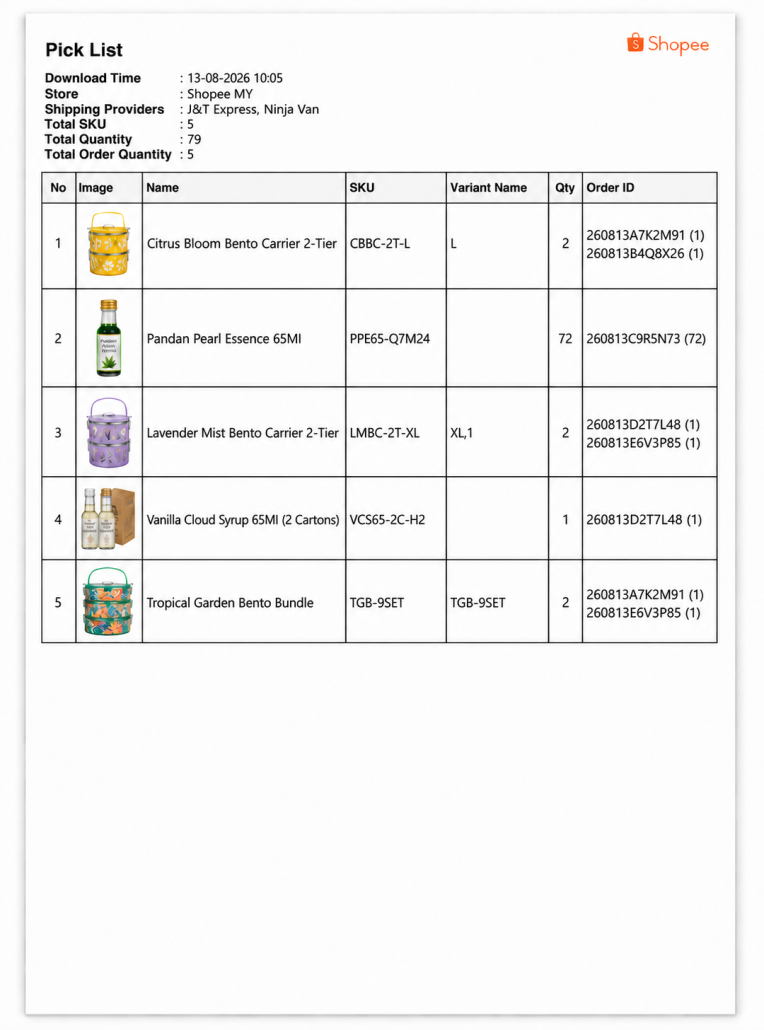
Every pick list should clearly show:
- Order number
- Product name
- SKU
- Product variation
- Quantity
Ask employees to pick according to the SKU, not only the product image or product name. Give every product variation a unique SKU for the ease of identifications.
Zetpy allows sellers to generate pick lists for supported marketplace orders. This gives the warehouse team a structured document to follow instead of referring to several seller dashboards or handwritten instructions. Zetpy also supports the generation of packing lists, airway bills, sales orders, and carrier manifests.
3. Organise the picking area before the campaign begins
Before a major campaign:
- Place fast-selling products in easy-to-reach locations to speed up the picking process.
- Ensure all SKUs labeled and record it is on which shelf or storage.
- Remove damaged or discontinued products.
- Prepare a dedicated area for picked orders.
- Count and replenish best seller’s stock before the campaign starts.
Use separate baskets, trays, or clearly marked spaces for each order. This reduces the chance of products being mixed between parcels during packing process.
4. Add a packing verification step
The packing station should not simply packing products into a parcel. It should also act as the final accuracy checkpoint before shipment.
The packer should compare the items against the order’s packing list and verify:
- The correct SKU and variation
- The correct quantity
- All bundle components
- Any promotional gifts
- The condition of each item
- The customer’s shipping label
- The required packaging method
If your team packs many orders simultaneously, print the packing list together with the correct airway bill. Keep both documents with the content of the order throughout the process so that labels do not get exchanged between parcels.
5. Keep inventory updated across every sales channel
When the stock shown online does not match the stock in your warehouse, it can create problems for both your team and your customers.
Your packing team may spend time looking for an item that is already out of stock. The order may then be delayed or cancelled, which can disappoint the customer and affect your marketplace performance.
To reduce this risk:
- Use one SKU structure across your sales channels.
- Record stock received, sold, returned, or damaged.
- Update stock immediately after manual adjustments.
- Set aside a reserved stock quantity for popular items.
- Synchronize inventory between connected channels.
Zetpy provides centralised inventory management for supported marketplaces and webstores. When an order is received from a connected channel, its inventory can be deducted and updated across the other connected channels. Sellers can also review stock-movement records to investigate adjustments and order-related deductions. Explore Zetpy’s inventory and channel-sync features.
6. Prioritise orders by shipping deadline
Processing orders only according to the time they were received may not always be enough. Different platforms, couriers, and shipping services can have different collection times and ship-by deadlines.
At the start of every shift, identify:
- Orders that must be shipped that day
- Express and same-day delivery orders
- Orders approaching their marketplace deadline
- Orders waiting for stock confirmation
- Orders affected by an address or payment issue
Create a priority queue and assign one employee to monitor deadlines throughout the day. This prevents urgent orders from becoming buried under newer orders.
Zetpy’s order filters can help sellers organise orders using information such as order status, ship-by date, seller account, and shipping provider. This helps the team focus on urgent shipments first.
7. Prepare documents and packing materials in advance
Printers, labels, boxes, and packing materials often become unexpected bottlenecks during a campaign.
Before the sale begins, check that you have enough:
- Shipping-label paper
- Printer ink or thermal labels
- Boxes and courier bags
- Tape and protective material
- Product labels
- Pick-list and packing-list paper
- Replacement printer equipment
Where appropriate, print shipping documents in batches instead of generating them one order at a time. Zetpy supports bulk order-document workflows for supported sales channels, helping teams prepare documents more efficiently during high-volume periods.
8. Review errors after every campaign
Do not treat an incorrect shipment as an isolated employee mistake. Record the error and identify where the process failed.
Track issues such as:
- Wrong product or variation
- Missing item
- Incorrect quantity
- Swapped shipping label
- Damaged packaging
- Late shipment
- Stock not available
After the campaign, review which errors happened most often. If wrong variations were common, improve your SKU and shelf labels. If parcels missed courier collection, adjust your cut-off time. If several orders were overlooked, improve your order filters and status checks.
Small operational improvements after each campaign can make the next sales period easier to manage.
How Zetpy helps sellers create a clearer fulfilment workflow
Zetpy helps multichannel sellers manage important fulfilment information from a central platform.
Depending on the connected sales channel and system, sellers can use Zetpy to:
- Consolidate orders from supported marketplaces and brands.com.
- Filter orders by status, account, print status, shipping provider, or ship-by date
- Generate pick lists, packing lists, airway bills, and carrier manifests
- Process orders without repeatedly switching between seller dashboards
- Synchronize inventory across connected sales channels
- Track updated order information in one dashboard
- Connect order workflows with supported POS and accounting systems
This gives picking, packing, customer-service, and operations teams a clearer view of what has been ordered, what needs to be shipped, and which orders require attention.
Final thoughts
Reducing fulfilment errors during a busy sales period starts with a clear and repeatable process.
Your team should know exactly how to pick an item, verify a parcel, prioritise urgent orders, and update each order’s status. When order and inventory information is also centralised, employees spend less time switching between systems and have fewer opportunities to make manual mistakes.
Preparing these processes before the campaign will help your team handle higher order volumes with greater accuracy and fewer delayed shipments.
Ready to simplify multichannel order fulfilment? Book a Zetpy demo to start exploring its order and inventory management features.