How to Customize Packing Lists and Pick Lists in Zetpy
Customize Packing Lists and Pick Lists in Zetpy for Clearer Order Fulfilment
A customer orders a black T-shirt in size M. Your team packs a black T-shirt in size L.
The product looks almost identical. The parcel leaves on time. But a missed detail can turn a completed order into a return, a replacement, and extra work for your team.
Clear picking and packing documents help your staff know what to collect and what to check before sealing a parcel.
This guide explains how to customise packing lists and pick lists in Zetpy, with a practical checklist you can use to review your own workflow.
Quick answer: In Zetpy, go to Order > Setting, find the packing list or picklist specifications, select the details you need, review the preview, and save. View the official setup guide.
What is the difference between a packing list and a pick list?
A pick list helps your team collect products from storage. A packing list helps your team check the items being prepared for an individual order.
They support different stages of order fulfilment:
| Document | When your team uses it | Main question it answers |
|---|---|---|
| Pick list | While collecting products | “Which items do I need to pick?” |
| Packing list | While checking and packing an order | “Does this parcel contain the correct items?” |
For example, a picker collecting several similar shirts needs clear product and variation details. The person packing the parcel needs to check that the selected items match the customer’s order.
Using both documents gives your team a clearer handover between picking and packing.
What details can you customise in Zetpy?
Zetpy documents these options:
| Available on both lists | Packing list options | Pick list options |
|---|---|---|
| Index number, product image, product name, variation name, shipping provider, total SKU, total quantity, and portrait or landscape orientation | Tracking number and buyer message | Order ID and order quantity |
SKU means stock keeping unit, a code used to identify a particular product or variation.
The goal is to make the details your team relies on easy to find. A useful document should support a quick, confident check at the point where the work happens.
How to customise your packing list in Zetpy
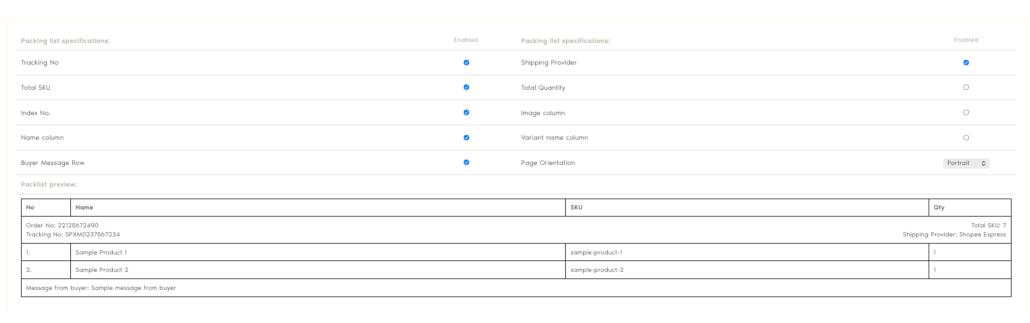
- Open Order > Setting.
- Find the packing list specifications.
- Select the information and page orientation you want.
- Review the sample preview.
- Click Save.
How to customise your pick list in Zetpy
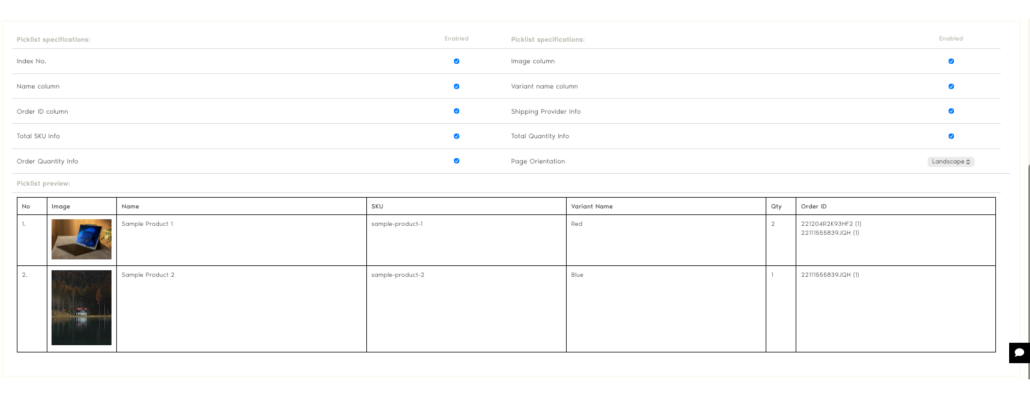
- Open Order > Setting.
- Find the picklist specifications.
- Choose the information and page orientation.
- Check the preview.
- Click Save.
How do you choose the right details for your team?
Start with the questions your staff ask most often during fulfilment.
“Which size or colour should I pick?”
Make variation details easy to read.
This is especially useful when your products look similar, such as clothing in different sizes or accessories with several finishes. Train staff to check the written variation rather than relying on appearance alone.
“How many units belong in this parcel?”
Build a quantity check into the packing process.
A correct product can still become an incorrect order if the parcel contains one unit when the customer ordered two. Check the physical items against the order before sealing the package.
“Which order does this item belong to?”
Make the handover between picking and packing explicit.
When several orders are being prepared together, keep each order’s items clearly separated. Agree on how your team will identify an order at the packing station so staff do not have to guess.
“Is this page easy to read?”
Test the printed document in the place where it will be used.
A layout that looks clear on a screen may be harder to scan beside a busy packing bench. Ask a picker and a packer to review it using a representative order with several products and variations.
Three mistakes to avoid when setting up your lists
Relying only on product images.
Similar-looking products can have different sizes, colours, or specifications. Use images as a visual aid alongside written details.
Skipping the final quantity check.
Picking and packing are separate opportunities to catch an incorrect count. Make the final check a consistent part of your process.
Changing the layout without explaining it to staff.
Show your team where to find the details they use. A short walkthrough can prevent confusion when a familiar document changes.
Your picking and packing checklist
Use this checklist to review your workflow before the next busy sales period.
Before picking
-
Product names are clear enough for staff to identify each item.
-
Similar products can be distinguished by their variations.
-
The required quantities are easy to understand.
-
Staff know how to keep orders separated.
Before sealing a parcel
-
Each product matches the order.
-
Each size, colour, or other variation is correct.
-
The number of units matches the order.
-
Any relevant customer instructions have been checked.
-
The parcel is matched to the correct shipping label.
After changing your document layout
-
A representative order has been reviewed.
-
A printed sample is readable at the packing station.
-
Both picking and packing staff understand the layout.
Frequently asked questions
Do small e-commerce teams need both a pick list and a packing list?
Both can be useful, even when the same person picks and packs. They create two distinct checks: collecting the required products and confirming the contents of the parcel.
Can a packing list replace a shipping label?
A packing list describes an order’s contents. A shipping label provides delivery and routing information. They serve different purposes.
Will clearer lists eliminate packing errors?
Clearer documents can support more consistent checks, but accuracy also depends on product identification, staff training, and how orders are handled.
When should I review my picking and packing workflow?
Review it when staff repeatedly ask the same questions, similar variations cause confusion, or incorrect quantities reach the packing station. These are useful signals that your documents or checking process need attention.
Make your next order easier to check
Start with one representative order. Follow it from picking to packing and note every point where someone needs to stop, ask a question, or double-check a detail.
Use those observations to improve your document layout and your team’s checks.
Need help setting up your lists? Contact Zetpy Support and tell us where your team gets stuck during picking or packing.