
If you are selling on Shopee Malaysia, it’s time to take a quick look at your pricing strategy. Shopee has announced a revision to its Marketplace and Mall Commission Fees, effective from 21 May 2026.
As a Zetpy user, you have the advantage of managing your business from a single dashboard. To maintain your profit margins, you need to be aware of these cost changes and prepare your Shopee listings in advance.
What is Changing?
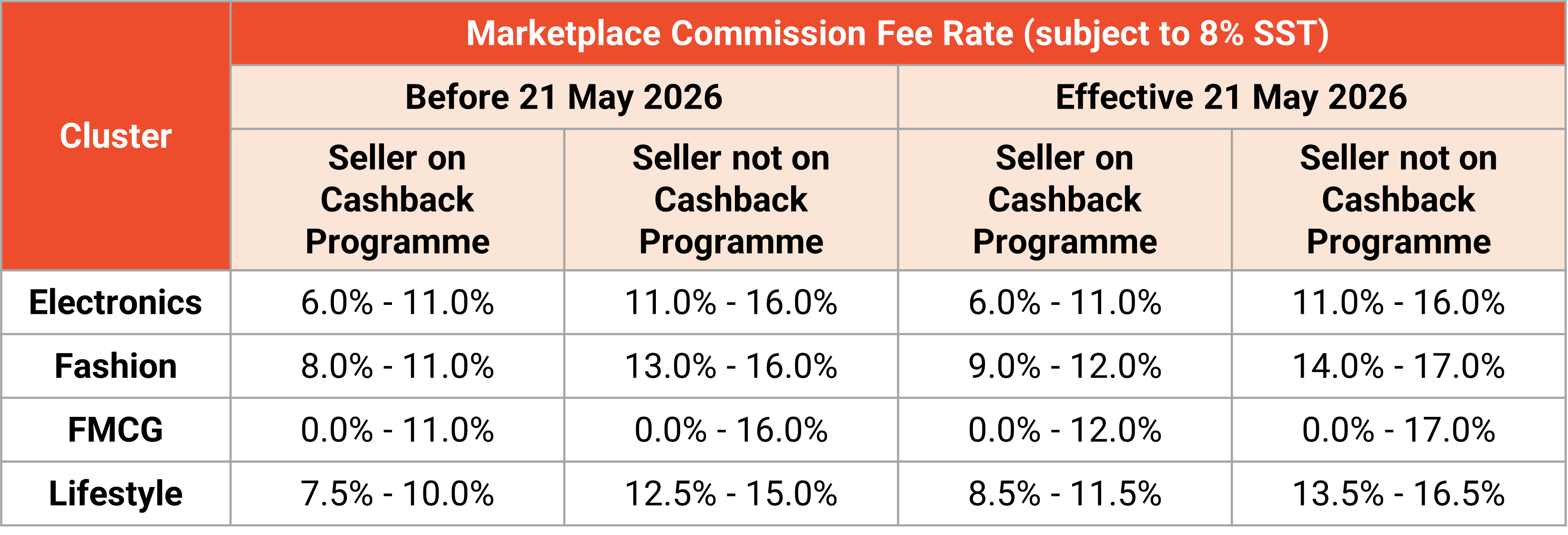
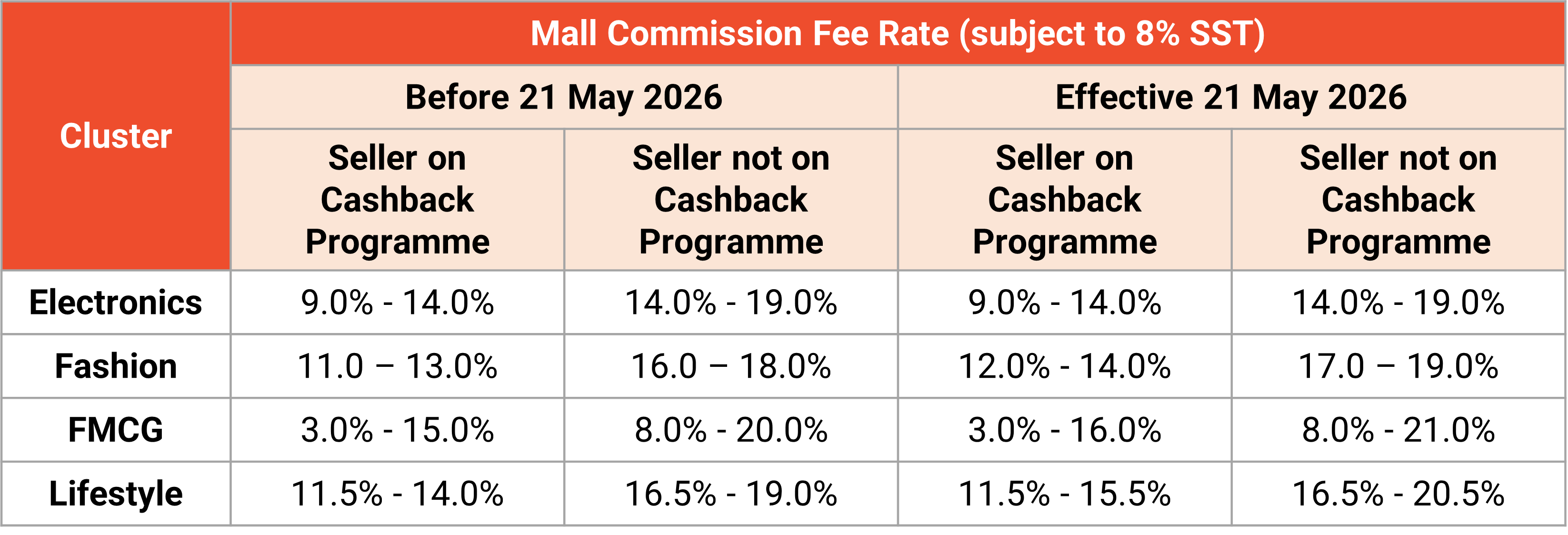
Starting 21 May 2026, Shopee is updating the commission rates across various product categories. This applies to:
1. Marketplace Sellers (Local non-Mall sellers)
2. Shopee Mall Sellers
Key Highlights:
– Commission Fee: Calculated based on the product price after seller-borne discounts (vouchers/rebates).
– SST: All commission fees are subject to 8% SST.
– Stacked Fees: These new rates are in addition to the existing 2.16% transaction fee and any opted-in service fees (such as Free Shipping or Coins Cashback programmes).
How to Prepare Using Zetpy Bulk Price Update
Manually calculating and changing prices for hundreds of SKUs on Shopee Seller Centre is time-consuming and prone to errors. As a Zetpy user, you can handle this transition seamlessly.
Step 1: Calculate Your New Buffer
With the commission increase, your current pricing strategy might need to change. We recommend calculating a new price buffer that accounts for:
– The new Category Commission Rate
– 8% SST on that commission
– The standard Transaction Fee
Step 2: Use Zetpy’s Bulk Price Update
Don’t wait until May 21st to make changes. You can use Zetpy to update your prices across your Shopee store efficiently:
– Check Your Current Pricing: You will need to check your current pricing and recalculate the new pricing to ensure the new Shopee fees are covered without eating into your net profit before updating the price in Zetpy.
– Sync Prices in Seconds: Instead of entering each listing, use the Zetpy Bulk Update feature to adjust your “Shopee Selling Price.”
– Only want to update your pricing in Shopee? If you sell on multiple platforms (Lazada, TikTok Shop, etc.), Zetpy allows you to set a specific price just for Shopee while keeping your other channels untouched.
Step 3: Factor in New Seller Benefits
If you have just opened a new shop, remember that Shopee grants a fee waiver for the first 120 days or first 100 completed orders. You can use Zetpy to keep your prices competitive during this “honeymoon phase” and then use the Bulk Price Update once you become a seasoned seller.
The Bottom Line
Operating costs in e-commerce are always shifting. The best way to stay profitable is to stay informed and use automation to your advantage. By using Zetpy’s Bulk Price Update, you can adjust to Shopee’s new fee structure in minutes rather than hours.
Need a guide on how to use the Bulk Price Update tool? Check out our tutorial on how to do so.
For the full breakdown of official rates by category, visit the Shopee Seller Education Hub: Marketplace Fees | Mall Fees.