Zetpy Shopify Sync vs Zetpy’s Shopify as Master: Which Setup is Right for You?
When you expand your e-commerce operations from Shopify to marketplaces like Shopee, Lazada, and TikTok Shop, managing inventory can quickly become a headache.
To keep your stock accurate and automate your workflows, Zetpy offers two distinct solutions: Zetpy Shopify Sync and Zetpy’s Shopify as Master.
Choosing the right setup depends entirely on where you want your Master Platform to be. The right choice simply depends on how you already run your business today, you just pick the setup that matches your current daily routine.
🔍 Which setup is right for your business?
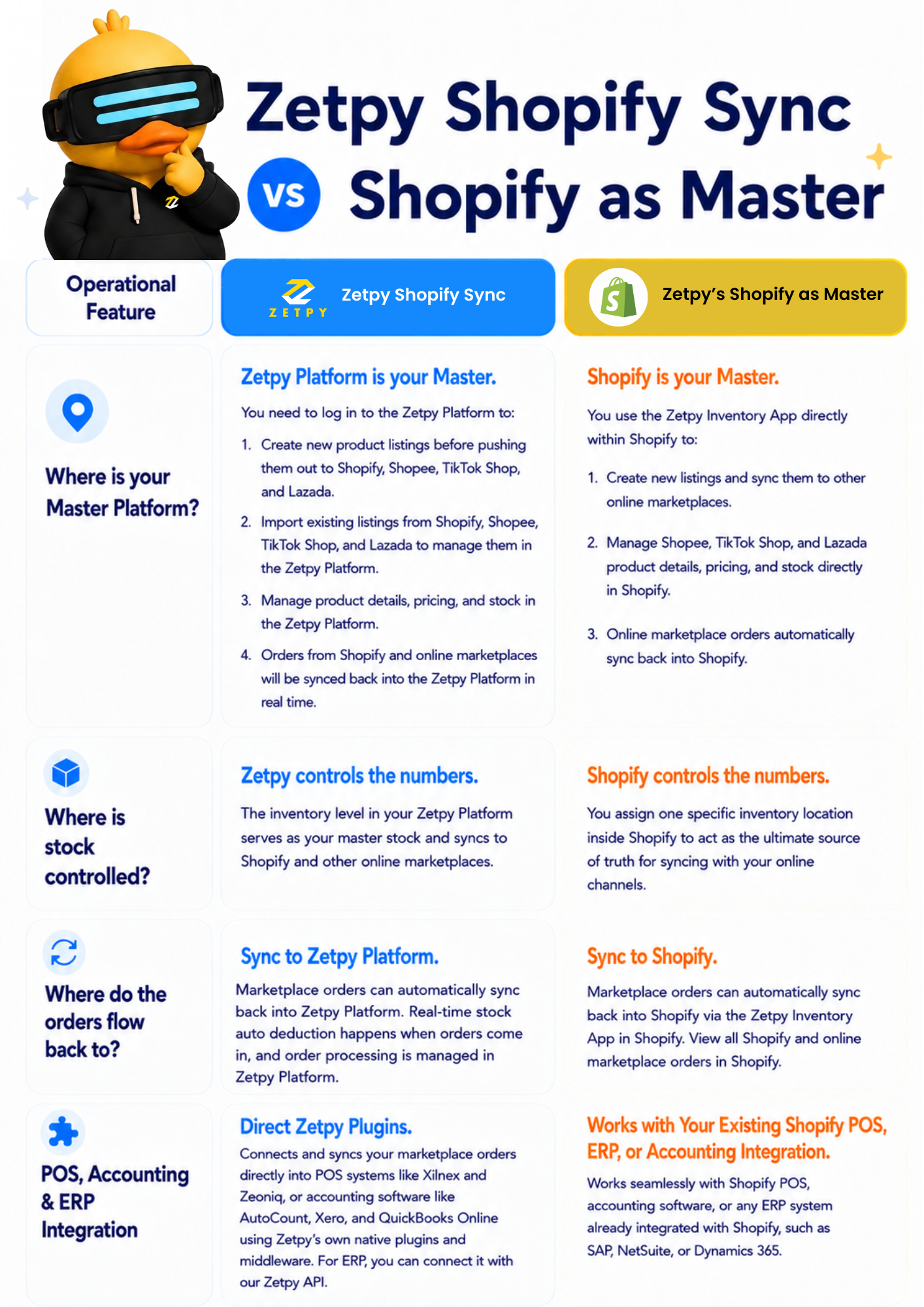
– Profile A: Choose Zetpy Shopify Sync if you want to be a…
Marketplace-First Seller that need to talk directly to your POS, Accounting software or ERP because your Shopify store isn’t connected to it.
- You need a Centralized Multi-Channel Hub: You are not using Shopify as your main inventory platform but want a single, dedicated platform to build product listings once and push them out to all marketplaces (Shopee, TikTok Shop, and Lazada).
- Using Third Party Accounting Sync: You use accounting software like Xero, QuickBooks, or AutoCount that is not connected to your Shopify store, and you need a simple way to automatically sync your Shopify and Online marketplace sales data directly into it.
- Using Third Party ERP/POS Integration: If you are using a retail POS system (like Xilnex or Zeoniq) or an ERP that are not integrated to Shopify, you can use Zetpy platform as your bridge. Zetpy easily connects these external tools to your marketplaces using our powerful built-in POS plugins or open API.
– Profile B: Choose Zetpy Shopify as Master if you are an…
Shopify-first business that wants to keep doing everything inside Shopify.
- Need a Unified Platform Experience: You want your team to work strictly out of one dashboard. If your staff already knows Shopify inside-out, this keeps their daily operations entirely inside the native Shopify interface.
- Using Shopify POS Setups: You already integrated Shopify POS with your Shopify. This setup allows marketplace sales order flows into your Shopify POS to further consoldation.
- Having Existing ERP/Accounting software integration with you Shopify: Marketplace orders can also sync directly through Shopify into your existing ERP (like SAP or NetSuite) or accounting software.
- Need to have Shopify is Your Master Inventory Source: You require Shopify’s inventory to be reflected to your marketplace stock availability as it is the most accurate.
Unsure which one fits your business operations? Talk to our e-commerce experts and recommend the best data flow for your business.